Image Image Image Image Image Image Image Image Image Image

TechWalls | May 24, 2013

Scroll to top

Top

61 Comments

Best CDN Services for WordPress

| Updated On

There are many ways to boost your website’s loading time, such as minimizing HTTP requests, optimizing graphics or making JavaScript and CSS External properly. Those solutions could help reduce the loading time, however, if your web pages have already been optimized, you will almost see no difference. It is too bad if you work hard to produce content and then it can’t reach readers. That’s why many webmasters and bloggers are trying another effective way to speed up websites, that is using Content Delivery Network (CDN) service.

What I will cover today is comparing the best CDN services available in my view. I’m not going to mention free CDN services because we can’t expect much from them and they didn’t work really well in my case. For example, I see many bloggers using CloudFlare, basically this is an advanced cloud-based firewall and it just works like a CDN to deliver content to visitors. I tried it too but soon I realized that the speed wasn’t improved and it is not a genuine CDN service. Therefore, I am going to cover the best paid CDN services as I know, MaxCDN, Google Page Speed CDN and Amazon CloudFront.

MaxCDN

MaxCDN is a very popular and friendly content delivery network. If you are hosting your blog with WordPress, you can use the plug-in W3 Total Cache and set up your site with MaxCDN in less than 10 minutes.

max-cdn-service

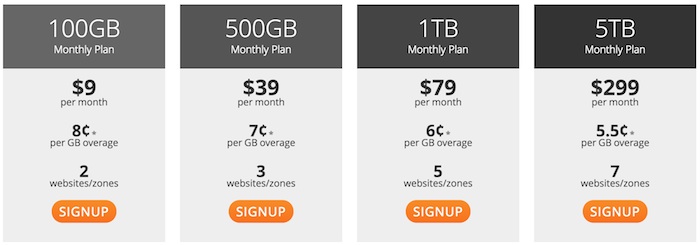
They are offering a special price for the service, you just need to pay as low as $39.95 for 1TB of bandwidth for a year. The price could be lower if you use the coupon code wpbeginner to get more 25% off the price. Besides, if you want to upload files 10MB and larger, you need to pay for the monthly storage, it just costs you $9.95 for 10GB. The overall fee is quite cheap compared to other services. If you are owning a WordPress blog with about 30,000 pageviews a day, it will take you just over $13 per month. After your first year on MaxCDN, the price will be increased to $99 for 1 TB of bandwith, however, it is absolutely affordable.

MaxCDN also provide you free shared SSL, custom domain for the path to the files, Pull Zone and Push Zone to distribute files. There were some complaints that the CDN network has no edge location in Asia, so it can’t optimize site performance for visitors from this area. It is true but it will be solved soon as MaxCDN has already planned on building more 4 edge servers in Asia/Pacific including Hong kong, Singapore, Sydney and Tokyo.

This is the best choice and I highly recommend the service if you really want to improve performance of your website. Their support staff also works really well. You can contact them via phone, email or live chat, the support team will help you solve any issue immediately.

Amazon CloudFront

Amazon CloudFront is probably the most reliable CDN service as it comes from a popular brand. Many people think it would be expensive but it is not in some cases. To get started using the service, you need to store your objects in another Amazon Web Service like Amazon Simple Storage Service or Amazon Elastic Compute Cloud. For the storage service, you will need to pay about $0,093 for 1GB monthly. Besides, Amazon CloudFront charges actual usage of the service in the 3 areas: Data Transfer, Requests, and Invalidation Requests. Its pricing varies for each geographic region, you can check out the pricing here. Remember that the price hasn’t included storage, GET requests and data transfer out of your Amazon Web Service to CloudFront’s edge locations. So, normally it could charge you up to $300 for 1TB of bandwidth.

You can see that the bandwidth pricing is quite expensive, therefore, Amazon CloudFront is absolutely not suitable for busy websites. However, if you have a site with low monthly transfer which is less than 10GB per month, this will be a good choice for you. CloudFront delivers content in lower latency in many areas as it uses a network of over 19 edge locations worldwide including 3 in Asia.

Google Page Speed CDN

Google has joined the CDN competition with its Page Speed Service. This is currently offered for free to a limited number of publishers. I had a chance to setup Google Page Speed CDN on my site and this is a really great service in my opinion. The loading time of my site has been improved by more than 50% and sometimes it is loaded instantly although my connection is very bad.

However, there are also some downsides of the service:

  • You can’t use it on bare domains that don’t include the prefix www, so you must use www.techwalls.com instead of techwalls.com.
  • HTTPS pages are not supported.
  • Websites hosted on Blogger, Google Sites or Google App Engine are not supported
  • Flash, streaming audio and video content and files over 50MB are not supported.
  • POST requests greater than 2MB are not supported.

The pricing details of Google CDN service hasn’t been available yet, however, they promised that it will be very competitive. So we can expect this will be another great choice for bloggers and webmasters.

Have you tried a CDN service on your website? What do you think about the performance of your website after using it? Which service will you recommend us?

Comments

  1. Hey Tuan, I’m so behind on looking into this so I really need to take a look. Thanks introducing these services to us and sharing the links.

    • Tuan Do

      You are welcome, Ileane.
      You should take a look at the services as you have a much more popular blog than mine. I am experimenting with these services and they are all working very well. I am running this site on MaxCDN and it is pretty easy to set up, do you see the change in the loading time of my site?

      • Tuan, as i understood you stopped using Google Page Speed CDN and you moved to Max CDN, can i know the reason? I’m actually using max CDN and few days ago i was approved to use Google Page Speed CDN. I afraid to switch since google service still under Beta.
        Could you please advise?

        Thanks

        • Tuan Do

          Hi Zinovsky,
          Actually I am still using Googe CDN service on one of my site for experiment and it is working really well in my opinion. The reason that I don’t use it on my main sites is because the service is still under beta and Google seems not to concentrate on developing it, so it could be stopped any time. Another reason is we can’t be sure about the price of the service when it gets official. Therefore, I recommend you not to change to Google CDN at the moment.

          • Thanks Tuan, i was thinking the same, is still beta so better not to use it with large websites.
            Thanks again :)

  2. Hi Tuan. Your blog load instantly in less than 3 seconds. Repeated view is 1 second. That is amazing speed. Actually I am looking for an affordable CDN services. May I know if the server like hostgator is down, can the CDN service continue to serve the web pages? Thanks for sharing this.

    • Tuan Do

      Hi Alvin.
      As the nameservers of your domain are still pointing to Hostgator, your site still can’t be reached when the hosting is down. However, you don’t need to worry much as I see the uptime of HostGator is very high, and when it becomes overloaded, your content are still be served very fast.

    • Hi Alvin! Recently probably you have also seen Hostgator ‘s performance is not good as expected. If you want to know about the status of any webpage, just register an account at Pingdom. They will instantaneously inform you about the server, both the down and up.

      CDN is not a kind of “second” hosting provider, so it can not replace a normal hosting service:-).

      • Tuan Do

        Do you have bad experience with HostGator? I am using some tools to track its uptime and it is almost 100% all the time. Sometimes it is the problem of our bad connection, not the hosting service.

        • Yes. It was a bad experience. Pingdom reports show 1-2 outages in a month. Before this is even worst. Now the failure reports getting lesser. Might be I am just unlucky to fall into overselling hosting servers that have a lot of different domains.

          Thanks, Daniel and Tuan. I am just thinking that maxCDN like cloudflare which offer uptime even the hosting is down. Guess it is not. But I will look into it and see how it helps.

          • Michael Aulia @CravingTech.com

            Umm.. I believe it is. Cloudflare, at least. It will serves your visitors the cache version and it will display that your website is currently offline. Of course, things like shopping cart and your WordPress admin will not be accessible but your posts will

            I have a screenshot that I took when my blog was offline at Hostgator but Cloudflare still displays my blog posts: http://www.cravingtech.com/7-reasons-why-you-should-use-cloudflare-to-speed-up-your-websiteblog.html

  3. Nice roundup Tuan! I have ever written best 10 CDN services with a simple conclusion that MaxCDN is the best choice for an average blog in the… first year!Now I am quite happy with it.

    • Tuan Do

      Yes, Daniel. I am trying MaxCDN on this blog and its performance is quite impressive. Unfortunately, it doesn’t have data centers in Asia at the moment, actually there is one but they are offering it for a higher price. I hope they will soon complete the 4 edge servers in Asia like they promised. I will continue using their service even if the price is $99. :)

  4. Your blog load times are incredible, I was looking at Amazon S3 which I am using now but was considering Cloudfront because many companies block s3.amazon.com content and therefore all my CSS renders wrong behind corporate proxies on Amazon. I am considering testing Cloudfront but am concerned with the costs as I have heard they jack up quite a bit, right now I was paying about $6 per month just for static pull of content for S3 storage, but not sure how much that will increase once I throw CloudFront in front of it.

    • Tuan Do

      Hi Justin,
      If you use the CloudFront along with your S3 storage, I guess you will have to pay about $15 each month then. They charge for the storage in S3 and transferring between your origin server and edge locations. You can check out the detailed pricing on its page http://aws.amazon.com/cloudfront/#pricing, I think the price is quite affordable.

      • Yeah, I am going to test it out with a smaller blog to learn how to configure it with using a subdomain for my hosting. I just haven’t had time this week, I also don’t want to experiment with my big site because I don’t want to risk an outage. All the websites online I have found and W3 Total Cache instructions are a bit confusing on how to configure for Cloudfront, was easy for S3.

        • Tuan Do

          Setting up the Cloudfront and S3 for W3 Total Cache is pretty easy too. After creating a bucket in S3, just go to CloudFront to fill in those information and create the distribution. You will then receive a domain name of the distribution to configure in W3 Total Cache. Let me know if you have any problem setting it up.

  5. “I tried it too but soon I realized that the speed wasn’t improved and it is not a genuine CDN service. ”

    I’m curious why you don’t think CloudFlare is a CDN? We do cache static content.

    “I tried it too but soon I realized that the speed wasn’t improved and it is not a genuine CDN service”
    When did you try the service? If you tried it months ago, for example, it was probably before we added most of our datacenters.

    • Tuan Do

      Hi Damon,
      I tried CloudFlare about 2 months ago and I was a little disappointed. The first thing is the loading time was almost not improved, sometimes I even saw the downtime on my site, I guessed that CloudFlare doesn’t reroute visitors to the next closest datacenters when the closest one is down. I couldn’t check which datacenter is being used and control files cached on the servers.
      In conclusion, I don’t see any change when using CloudFlare and that’s why I stopped using it.
      Btw, I hope you would clarify those problems too. Thanks.

  6. Where are you located? One thing to keep in mind is that the caching can also take a few days to build out, so site speed would get progressively faster.

    “I guessed that CloudFlare doesn’t reroute visitors to the next closest datacenters when the closest one is down.”

    We actually do pull out of a datacenter once we know that there is an issue. This would automatically cause routing to another datacenter.

    “I couldn’t check which datacenter is being used and control files cached on the servers.”
    You can do a traceroute to find out which datacenter you’re hitting. If you need help reading it, I can help decipher where you’re hitting.

    We’re working on stronger file management.

    “sometimes I even saw the downtime on my site”
    This can happen if you have something at the host or server level blocking our requests (or the server is actually having issues). Details below:

    Tips to ensure CloudFlare’s IPs are accepted by your server If your server origin is online, then: 1) Make sure that you’re not blocking CloudFlare IPs in .htaccess, iptables , or your firewall. 2) Make sure your hosting provider isn’t rate limiting or blocking IP requests from the CloudFlare IPs and ask them to whitelist the IP addresses below:

    • 204.93.240.0/24 (204.93.240.0 – 204.93.240.255)
    • 204.93.177.0/24 (204.93.177.0 – 204.93.177.255)
    • 199.27.128.0/21 (199.27.128.0 – 199.27.135.255)
    • 173.245.48.0/20 (173.245.48.0 – 173.245.63.255)
    • 103.22.200.0/22 (103.22.200.0 – 103.22.203.255)
    • 141.101.64.0/18 (141.101.64.0 – 141.101.127.255)

    • Tuan Do

      Thanks Damon,
      I will give CloudFlare another try and compare its performance to MaxCDN. I had a bad experience with it and hopefully it will be improved this time. Recently, a blogger in my network also complaint about the service, his website is inaccessible even when the hosting service is up and this was solved after he disabled CloudFlare.
      Btw, I heard some other bloggers say that we can’t use CloudFlare and MaxCDN together and it even could slower the loading speed. Those problems are really concerning me.

  7. olawaledaniel

    Thanks Tuan for this awesome information. This recommendation can be of great help to my website performance. Nice share :)

  8. Nasif

    I am using cloudflare CDN and facing no issue so far. It will be great if you can publish a post about the difference in speed and performance between Cloudflare CDN and MaxCDN. If MaxCDN is better then I will definitely use their service.

    • Tuan Do

      Do you check the uptime of your site, I’ve seen some bloggers complain that their sites were down just because of CloudFlare CDN. I moved to MaxCDN after not seeing improved performance with CloudFlare. I will spend some time to compare it exactly.

  9. Tuan,

    You rock, I used the very first suggestion due to the W3 Total Cache tie in and I went from 15.6 seconds site load time to as low as 3.6 seconds to 5.6 seconds, truly awesome.

    thank you very much.

    Mike

    • Tuan Do

      Awesome, Michael.
      I’m very glad as my suggestion works for you. I can see the loading speed of your site is amazingly fast.

  10. Nice round up of CDN services!! There’s another plugin that I found. It was released two days ago, called CDN Speed Cache. One click install, Paypal payments of $29/month and you get EdgeCast CDN caching services! Site easily loads twice as fast. Check it out :)

  11. Matt

    Tuan Do,
    If you really care about your page speed, leave Host Gator. I’ll give you a example. I’m starting a new blog, and went with Host Gator recently. After starting to develop the blog I noticed it was slow no matter what I did.

    Search Engines like google look at page speed and it means alot. I went from $7 a month to a $12 (Got a 35% Off) Host who is lightning fast. I get .89 – 1 second load time all day long. My site has only been up for 2 months, in which I’ve had no time to even make posts. It’s already a Page Rank 3.

    If you would like any help or suggestions you have my e-mail now, and I don’t mind giving you information about what I’m runnning on my site to get the speed I am.

    Great Post, and Topic here,

    Matt

  12. I believe the MaxCDN is too good.. Anyway Nice post.

  13. That’s interesting; I didn’t know that Google had a CDN offering. For now, i’m using Amazon Cloudfront in conjunction with W3 Total Cache and I’m very happy. My site isn’t massively busy, but it’s also not quiet, but my monthly cost is still just a couple of bucks. Not bad at all. I’ll be keeping an eye on it though.

  14. Hey Tuan, Great Post, help me a lot for choosing a right service. I am also using CloudFlare and quite satisfied with and also compared Speed before using Cloudflare, there was drastic change in it.
    So, I think you should re-consider “CloudFlare”.

    • Tuan Do

      Thanks for your recommendation, Aditya.
      I will give it a try after the subscription to MaxCDN ends because I still have no complaints about the service. Hopefully CloudFlare will remain free then. :)

      • Just a suggestion that you or someone else may suffer in future.
        That You Must not activate W3TC along with CloudFlare, this create problem and slows down website, I am telling you from my experience.

        Regards

        • Tuan Do

          Thanks a lot, mate.
          I saw the CloudFlare option in W3TC and thought they should work well together. I will need more research before changing to CloudFlare then, I am not sure it could be as good as MaxCDN.

          • Agreed. Not good as MAXCDN But a lot helpful because it’s free. :)

      • Lazlo Dreamus

        Hi there Tuan Do, i been following this post and the comments, i wrote up a trick how i setup amazon s3 bucket as cdn with Cloudflare as the CDN on my site, which saves a lot of bandwidth and request, you should really reconsider Cloudflare they are great free service using it on other websites and the results are amazing compared to other methods, best part it is free, by the way love your post and research.

  15. Hi Tuan Do, I’m thinking of getting the MAXCDN, but my question is, will getting a CDN service improve my site performance, decrease page load times and increase SERPs? Google webmaster tools suggest that my site is slower than a typical site.

    • Tuan Do

      Yes, absolutely it can decrease your page loading speed. I’m using MaxCDN and my loading speed is always less then 2s now.

  16. I have never tried CDN services. Just using WP-Super Cache. Will think about going with MaxCDN. Thanks for sharing Tuan.

  17. 2Nuts

    Tried couple of times for a Google Page Speed CDN but no luck yet. I’m hesitant to use CloudFlare because it needs to change the DNS IPs.

    • Tuan Do

      Yes, that’s right. You will also need to change DNS with Google Page Speed CDN. If you don’t want to change it, try MaxCDN.

  18. Satrap

    Hi tuan, I was actually thinking about purchasing MaxCDN but I was not just sure. I was just afraid that it would be too complicated to set up but from reading your article it seems like it’s it’s a really simple set up. I am going to get a try as my site speed is really down in the past few months especially since I have been getting more and more visitors. I will give it a try, thank you.

    • Tuan Do

      You are welcome, Satrap.
      Yeah it’s very easy to set up MaxCDN, it often takes about 5-10 minutes with their step-by-step guide. The service has improved my site speed dramatically and I am ready to extend another year. There is nothing to complain. :)

      • Hi Tuan,Thanks for the reply.So, I went ahead and got the max cdn and installed everything accordingly.Now, prior to that, my Google webmaster tools was telling me that on average my pages take about 11.7 seconds to load.I set up max cdn yesterday and the GWT’s updated number is about the same. Does it take a while for the effects to show up? Is there anything I am missing here?…Thanks in advance.

        • Tuan Do

          Hi,
          You can check in your account to see if the CDN has been in effect. The loading speed varies in different locations, so I think the Google Webmaster tools can’t calculate it exactly. You can use tools like Pingdom to test the loading speed of your site from some locations, I think you will have more accurate numbers then.

  19. Hi Tuan

    Very helpful article, thank you.

    I use hostgator, so my server is based in Texas I believe. But 35% of my readers are from Australia, around 20% from the USA and about 20% from the UK. The rest are from all over the world. I can see how Max CDN would speed up the user experience for my UK and USA readers, but I suspect it will do nothing for my Australian readers. Is that correct? Should I be waiting until their network covers Asia/Pacific?

    • Tuan Do

      Hi Bob,
      Actually MaxCDN has edge and peer locations in Asia and Australia now, but you will have to pay more for it because of the higher bandwidth costs. If you really need to speed up your website, this shouldn’t be a big problem.
      I guess they won’t make the advanced feature available soon because they want to keep the pricing as low as possible. So, don’t wait for that. :)

  20. Thanks for your answer Tuan, I have sent a message to Max CDN to try and confirm they are now in place, because their website is still saying pending. I’ve also asked about those extra charges, so as soon as I know, I’ll post back here. Thanks!

    • Well, I asked the question twice in support and didn’t get an answer. So today I went on to live chat and asked the question again, and was told that they do not have a network in Asia or Australia and cannot tell me the ETA when they think it will happen.

      Do you know anything about instantCDN.Asia?

  21. Hi Tuan,

    Thank you for the review. I heard a lots of good reviews about MaxCDN, so I’m not surprise to see it #1 on your list.

    My site is not a really large site since it’s a religious website. I have around 6.000 – 7.000 unique vistors daily, but so far I’m very happy with the free service from CloudFlare. I also have W3 Total Cache installed for my blog and with the right settings, I think these 2 combined will do for any avarage site.

  22. I’m currently using the PageSpeed Service and I’m having nightmares… Sometimes I get Blank Pages… It makes me want to get the MAXCDN, but I just don’t want to give up on Google just yet.

    • Tuan Do

      Are you sure about that? I have been using the PageSpeed service for nearly 2 years and still don’t have any problem. Everything is great and I am still tracking the uptime of my site, it is 100% and I never saw a blank page as well.
      Possibly it is some conflicts with your plugin, Google recommend not to use any cache plugin with the PageSpeed Service.

      • I uninstalled the WP Super Cache and I’m still getting some Blank Pages Displayed Initially later after second try it loads normal.

    • Tuan Do

      That’s strange. I have 2 blogs running on PageSpeed service now. Could you check them out and let me know if there is any issue? http://www.bloghelpdesk.com/

      • After a couple of hours of Google searching, I made it work. IT was really frustrating.
        I think the plugin cache was causing all problems. Also, I have noticed that you have to tweak it the mod rewrites in other to be compatible with your wordpress site depending your needs.

        Thanks for not letting me give on Google.

  23. I’m very happy with Google Page Speed now. I even made a tutorial for an easy integration with wordpress. Maybe some readers might find it useful. Check it here: http://www.dexmag.com/USDN2

  24. After started using maxcdn for my blog, i am able to see huge difference in google page speed score result. This is a must have service for a blog and any dynamic websites.

    Google Pagespeed CDN is giving some trouble for me at times. their support system is quick to address the issue but solving ration is less due to different software we use at our server end.

    Robi

Submit a Comment