Image Image Image Image Image Image Image Image Image Image

TechWalls | May 24, 2013

Scroll to top

Top

152 Comments

How to Use 3G Dongle on Asus Transformer

| Updated On

The Asus Transformer tablet was released a few months ago and and has received a lot of positive reviews. However, the most concerned subject about this tablet is its Internet connection because Asus announced the Wifi version only and the 3G version hasn’t been available yet.

If you purchase the Transformer with its keyboard dock, you will see there are some USB ports there and you are maybe wondering if you can using your 3G USB to connect to the Internet. I’ve tried a solution on XDA and the answer is Yes, you can.

To make it possible, you need to follow these steps exactly:

1. Backup all data in your Internal SD Card with a backup app like Titanium Backup.

2. Download NVflash and Prime 1.5.

3. Extract NVFlash and Prime v1.5 to the same directory. The image files of Prime v1.5 should be unpacked into the NVFLashTF folder.

4. Connect your Asus Transformer to PC via USB. Then simultaneously hold the up volume and Power button until a device named APX appears in the Device Manager. The screen of the Transformer could turn black but there is no problem.

5. Go to the APX device and install its drivers from directory USBPCDriver (in NVFlash)

6. Run Download.bat (Windows) or Download.sh (Linux).

7. After a while (about 10 minutes), your device will be rebooted, then there will be a setup wizard. At this step, choose the connection 3G and Wifi.

8. Download these files:

tf101 huawei install scripts.zip
Patch 3g acer31stock usb.zip
Driver AT
JDK
Android SDK

After installing Android SDK, you will see the Tools folder there. Extract the 2 files tf101 huawei install scripts.zip and Patch 3g acer31stock usb.zip to this folder.

9. Connect Transformer to PC. Go to Transformer’s Settings – Applications – Development to enable USB Debugging. Then run install-TF101.bat in the Tools folder.
asus-transformer-3g

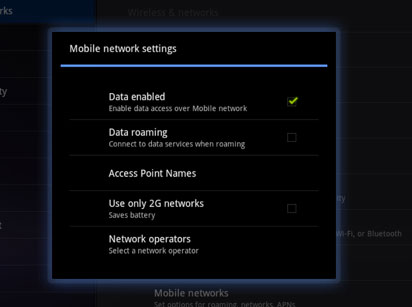
10. Go to Wireless & Networks – Network operators – Access Point Names to configure your network (remember to choose e-connect). Connect your 3G Dongle and enjoy surfing the Internet on Asus Transformer.

Please leave a comment below if you have any problem with the process.

Comments

  1. Brian

    Thanks for that, great guide! Just curious, does this entail flashing/using roms? Don’t fancy invalidating my warranty.

    Thanks again,

    Brian

    • ricky

      Yeah Brian,
      Actually you will have to root your device and use another ROM. If you are not used to the procedure, I don’t recommend you to follow the instructions.
      Good luck, anyways.

      • luke

        So I have given my Prime root access and used the UMTS app, yet I cannot gain internet connection with the 3G dongle, I dont want to ROM due to no OTA, is there another way?

  2. David

    Hi, thanks for the tuto, in the 10 step, when connect my usb 3g modem, nothing happen, please, can you explain one little more this final step. Thanks a lot

    • ricky

      Hi David,
      In this step, you need to create a new APN. On the first line, fill in the operator’s name, and you choose e-connect on the 2nd line. Have you installed all the drivers above?

  3. Kyle

    Would this work on the ASUS Slider too.

    • ricky

      Hi Kyle,
      I’m not sure about that.

    • Tamer

      Did you try it with Slider? and what is the results?

  4. Mike

    Hi,i think I made a stupid mistake ,because i did exctract the NV flash and Prime into one folder but i forgot to make the back up from step 1 and after running download.bat the tablet halt on the black screen and wasn’t able to be turned back on (nothing appears on the screen). Did I have to extract the NVflash and Prime into the backup folder instead into an new folder ,and is there a way to turn the tablet back in normal working mode? Thanks

    • Kite

      Hi, i did the same thing too… any solution yet?

  5. Javier

    Hello,
    How do you save the configuration? There is not a save button and the configuration does not stay,as soon as you leave the page the conf is lost.
    Thanks.

  6. a reader

    just a question:
    i am receiving my transformer tomorrow as we speak.
    just wondering what do u mean by backing up from the internal SD card?
    i mean the guide number 1.

    tnx

  7. a reader

    just wondering if u could pls have a sort of video or graphic demonstration of these steps.
    i really need to have my transformer working on 3G modem stick, since i am on the go all the time.

    thank u kindly

    • Tuan Do

      I’m sorry I couldn’t make a video tutorial. I meant you need to back up data in your SD card. Let me know if you have any problem setting it up.

  8. a reader

    well
    as soon as i get the unit, i will try to set things up.
    all i really need is to be able to use the transformer on the go.
    i wanted to wait for the newer version with 3G, but time is limited.
    since i have a modem mobile stick, and this version of transformer is not supported with 3G, i thought i could use it with the USB modem stick.
    since the unit is new, i dont think i do need to do any SD back up.

    thank you for the prompt reply.

  9. Zurichk

    Hi,

    This procedure can work for asus transformer and ZTE usb 3g stick?

    Please advice, or there is another form to connect to connect to the internet the asus eee pad?

    Regards

  10. KS.Chin

    “Go to Wireless & Networks – Network operators – Access Point Names to configure your network (remember to choose e-connect).”
    Where to chose the “e-connect? The “Tools” folder is from our desktop not the tablet pc right?

    • Tuan Do

      The option e-connect is on the 2nd line when you create a new APN.
      Yes, the Tools folder I mentioned is from your desktop.

      • rachel

        Hi

        E-connect does not come up as an option. Does this mean i have not installed the drivers properly? I cannot seem to save any new APN’s

  11. sen

    Hi Tuan,
    Awesome tuto. I have just recvd my TF101 (Android 3.version) and want to do this
    I have 4 questions:
    (1)The downloadable files in Points 2 and 8 will be common irrespective of what model 3Gdongles we will use and networks we will select, right?
    (2)I am not familiar with this but i am willing to follow your guide EXACTLY. Is that OK and can i then get this mission accomplished? Or do I need t know something else which you haven’t mentioned on the assumption that folks who will try this are knowledgeable folks? (i am a bit concerned about your reply to Brian)
    (3)If something goes wrong during the procedure (like that of Mike or Kite) can we return back to the original factory settings by pressing some sort of a “reset” button?
    (4)Why is this necessary? I have seen the TF101 can get internet connection on the move from a mify gadget. Is it because that although we can use a mify (because the TF hooks on to the mify’s hotspot) but we will not be able to use a 3G dongle directly (because the TF is not 3G enabled but only wify enabled)?

  12. Bro

    Does this work on the asus eee pad transformer TF101 as well?

    • Tuan Do

      Yes, it works on the TF101.

  13. Bro

    if something goes wrong can we return back to the original factory settings by pressing some sort of reset button? can you please respond to this?

    • Tuan Do

      Yeah, you can hard reset your device anytime by holding the Volume Down button and firmly press and release the Power button.

  14. a reader

    hi there
    well, i have my transformer.
    unfortunately, it is not what i expected. a lot of application which been supported by windows, still not fully running in Android. i do lots of forex work in pro level and high level security financial transfers between the accounts and this is not possible on the transformer.
    however, now i purchased it and no choice just to use what i can.
    i still havent been able to figure the usb modem instal on this device yet.
    in fact i tried from the fist step, but even extracting the nvflash is a hurdle for me.
    i cant figure it out how things work in Android.
    so, any suggestions pls?
    any type of commands, step by step that you would recommend and have in mind to help me go through this. i really need to use this as a portable on the go device working on my usb modem 3g which i purchase from vodafone and turkcell, which i do work in Turkey at the moment.
    the usb modem both work on my lap top, but the Android is not supporting it .
    so, if u could help me pls, i would really appreciated.

    regards

  15. a reader

    hi again
    have u seen this video on youtube.

    pls note

    http://www.youtube.com/watch?v=dN6F2wVg4uw&playnext=1&list=PL8408779B45BE6FB3

    this is all i need, but i can not see any plug for the cable like this in my asus.

  16. Sarevok

    Will this work with Prime v1.7 (which I am already running on)?

    • Tuan Do

      Absolutely, the new version should work.

      • Sarevok

        I was running on stock before and flashed Prime v1.7 from microSD card using CWM. There was no wipe involved – I have never seen any setup wizard where you could choose “3G and Wifi” as described in step 7. That’s why I asked.

        I rooted my device so that I mess around with some files in the system directory and change the layout of the keyboard dock. While I was at it, I wanted to play with some custom ROMs as well, to see whether that could prolong the battery life etc., so I flashed current version of Prime ROM. I only discovered this site after that. I am not in dire need of 3G right now, but it might come in handy in the future…

  17. Shelly

    Hi,

    To be honest, I have just purchased Vodafone MiFi that needs none of this. You turn on the MiFi device, put the network key into your transformer as you do with all secure WiFi and hey presto! And just to state the most brilliant points of this option, not only do you get WiFi on your Transformer, 4 other devices can also connect to it and you can put an SD card into the MiFi device to share files amongst all 5 of those devices. It’s truly brilliant and for this reason I won’t be compelled to buy the new 3G version Transformer. The offers you get with Vodafone for MiFi are wide ranging (even 30 day contracts) and for the £20 premium package, not only do you get a MiFi device, but also a free dongle I believe. I’d highly recommend this solution. It’s a sleek design, well built, fast, reliable as it connects to 2G and 3G unlike the Three offering and its a simply no fuss connection. Hope this helps

    • neoetern

      Shelly,

      This is exactly why they have restricted a 3g connection on this tablet and tethering in most of the smart phones so that you will pay more to get these functions, which are in-fact quite easy to set up. Ever wondered why tethering is not possible in the ultra-modern smart phones but was a normal thing in the old symbian based Nokias!

    • Beth

      Th sounds like a Vodofone promotion. I travel to developing nations where i have to use a locally purchased wifi modem dongle. It doesn’t work on the Asus TF101.

  18. Henk

    I will try this for my TF101 but wath are the driver
    Driver AT ore where can I found it?
    I have looking on the Asus site (windows and Android but I can not find him :(

    Works this also with the Huawei / Medion Mobiel S4011

    Please help me :)

    tanks
    Henk

  19. Henk

    Please,

    is there anybody they will and can tell my where I can find / ore wath are the DRIVER AT.
    I cannot found him.

    Asus Transformer????
    Asus Trasfer????

    By klikking the link i coming on the asus site downloads but I cannot find him whit only AT.
    I am looking now a few days. SO please HELP!!!

    • Tuan Do

      Hi,
      That’s the Asus Eee PAD Transformer TF101 USB Driver, you just need to go to this link, choose the OS and start downloading.
      Good luck.

  20. Octa

    Hi,
    I’ve just used your indications and it’s working.Thanks, but now i want to revert back to the original android 3.2 version. Where do i find the original files and witch are these (system.img , boot.img, recovery.img???) Thank you in advance

  21. Octa

    Hi Tuan Do, me again
    It’s ok if u give me the originals files for android 3.1 to let me to make update for 3.2, because now it’s imposibile as you know. Please help ! Thanks

  22. Octa

    Hi,
    I have an ZTE MF110 3g usb stick. Where i can find driver for it???
    please help!

  23. a reader

    Hi Tuan Do
    unfortunately, i have still not been able to set my transformer for 3G. any ideas? i know to follow the steps, but some of these steps which i am not really familiar with Android in such.

    i hope u can help.

    thank u

  24. Anushka Sharma

    good tutorial, thanks for sharing….

  25. RV

    Hi,
    Given that you use 3g-acer31stock-usb.zip, will this work with 3.2 versions of prime?
    Thanks,
    RV

  26. Kaan

    Hi Tuan,

    I have followed the steps 1 to 5, but when I tried to run download.bat the command promt appears and dissappears instantly.
    Could you please help me out?

    Thank you.
    K

  27. georgemikan

    Hi!
    Does enybody complete all 10 steps and connect to the internet?

  28. newbee

    Thanks for the instructions… i’m about to get myself either a transformer or a thrive…

    was wondering if:

    1) the above steps will work on either one of these devices?

    2) you can please3 share some tutorial video on this… let us have greater confidence b4 buying the non-3g items ~ haha!

    barely got cash for another 3g-based tablet if i ought to buy the one without the 3g feature…

    hope u can consider these please. Thank you!

  29. Rui

    Hi. I tried those steps on a pc with windows vista and windows 7 32 bits, and always happens the same. I configure the APX with the drivers on the folder, but then when i run the download.bat it makes nothing. The command windows just disappears and I think that it says that it cannot write in that usb device. Then the device disappears and when I try again to run the download.bat it says “device not found” or something like that.

    Can u help me?

    Thanks.

  30. Leandro

    Hello, I could do to step 7.

    From step 8 am with some doubts.

    - All of these programs do the installation on your PC?
    - In step 9 must run the installation file TF101.bat in the Tools folder where this folder is located?

    • Thomas

      by default: “C:\Android SDK\tools”

  31. bloodyhell

    Bloodyhell, hope everything else is not made that complicated. In these days that sounds miserable.

  32. Anthony

    Will this work in any 3G dongle (e.g. ZTE, Huawei, etc)

    • Tuan Do

      Hi Anthony,
      Here is the list of 3G dongles that were tested successfully:

      - ZTE MF 639
      - Alcatel X225L
      - Vodafone K3765-H
      - Vodafone K3715
      - Vodafone K3565 / Huawei E160
      - Huawei E156G
      - Huawei E160G
      - Huawei E161
      - Huawei E169
      - Huawai E170
      - Huawai E171
      - Huawei E173
      - Huawei E220
      - Huawei E270
      - Huawei E1550
      - Huawei E1552
      - Huawei E1692
      - Huawei E1750
      - Huawei E1752
      - Huawei E1762
      - Huawei E1820
      - Huawei E1823
      - HUAWEI K3520
      - HUAWEI K3565 -Rev 2

      • jaafer

        Huawai E177 doesnt seem to be working it wont search for a network :’(

        • jaafer

          and what am I supposed to fill in: mcc, mnc etc.? thnks

      • Thomas

        I have same issue as below, what do I fill in for the different forms? mcc etc

  33. Alex

    Hi Tuan,
    Nice work, but i still have some questions to make mine work, i wonder if you can help me:
    step 2 and 3 are suposed to be made on the PC? if Yes, i’m doing it right.
    I managed to make it work step 4 and 5, but on step 6 only a blackbox opens very quick and closes and nothing else happen. i am using windows 7-64. is there any thing else that i should be doing?
    step 8 should be done in the PC or in the Transformer?
    thanks bro

  34. velescu2004

    i want to use huawei e220 unlock modem to my tablet icer iconia A500 .android 3.2 honeycomb.what to do ?

  35. zahid

    hi tuan

    how to extract boot.img and all img files please help

  36. zahid

    Extract NVFlash and Prime v1.5 to the same directory. The image files of Prime v1.5 should be unpacked into the NVFLashTF folder

    how to unpack The image files pls help

  37. 007 ch

    does it work for prime 2.1

  38. greg

    Hi Tuan have a question about the Huawei E173. I am a in and out of Nicaragua (managua) and the E173 is used by the provider “Movistar” now they have their own windows ver program that will allow you to send sms messages after yo purchace time for internet. I have to buy 12 hour seg and each time i have to enter the program to send this 2266 and 2 in the message for 12 hour’s of internet. So if i have to use this program to access internet then will this system from XDA work. I still have to send a message so how does this account for this type of system. I have seen the same in Tanzania Africa also. Thanks Greg

  39. Sharan

    Where is this download.bat located

    • Thomas

      go to Android SDK install location (default: C:\Android SDK\tools)

  40. Charles

    Hi Tuan, i’m having an issue here, i’ve installed all the drivers, and when i try to run “install tf-101.bat” i get device not found errors within the cmd window, using windows vista 32 bit.

  41. Thiago

    Hello,

    i think i have missed any step. I can see everything, including DATA ENABLED. But i cant find any operator.

    When I reconnect the TF101 to PC again, to run the install-huawei, what should I see? because the install file runs locally in PC, and not in the TF101.

    Could you help me on that? tks a lot

  42. Ibanez2628

    With a slim, lightweight design and a 10.1-inch WSVGA IPS capacitive display made from durable and scratch-resistant glass that is viewable at angles up to 178°, the versatile Eee Pad Transformer is the perfect tablet for anyone who want to enjoy multimedia on the move, but still wish to have easy access to the web, email, and other productivity applications. A custom user interface provides easy access to the many features of the Android 3.2 (Honeycomb) operating system, while the NVIDIA® Tegra? 2 chipset provides full support for Adobe® Flash® 10.2,1 smooth HD video conferencing and playback, a lightning fast web experience, and incredible mobile gaming performance. Front and rear cameras make for easy video chat and digital photography, which can be played back in video on HDTVs via a mini HDMI output port, making it a true mobile entertainment device.

  43. justin

    what will i download in the DRIVER AT and JDK?

  44. SYMN

    I did everthing you said, but on the APN page i can’t create a new apn, it does’t allow this. I can enter just 2 lines and it accepts this then i enter mcc and mnc number then it dissappear.

    i thank to you for your help.

    Thanks

  45. thong

    Hi Tuan DO
    Tks for the tuto.
    Do u think this works, as well, on the Asus Eee Pad Transformer Prime TF201 ?
    Thanks

  46. Shiv Kumar

    Hi Tuan Do

    Can I perform all the steps you mentioned above, without rooting my device? I am concerned if the warranty would be void after I root my Asus transformer

    thanks!

    • Renuka Shah

      hello shiv kumar, you need to compulsory root the device inorder to perform the above steps. Rooting your Android device will cause your warranty void. so takere….

  47. Jocelyn

    I am using a Virgin usb stick but we do not plug it in. Instead, we use the wifi as we need to connect to a few computers at the same time. Does the method that you spoke about work for Asus TF101, so that I can get connected to wifi of Virgin? Please let me know as I am getting very confused as I read more and more comments being a computer idiot. Thank you!

  48. Saidalavi

    Hi,

    After running the .bat, the screen in ASUS showed success, but it never rebooted by itself and after that it failed to reboot at all by switching on also. Kindly reply that I should do to reboot my Asus.

    Thanking You
    Saidalavi

    • Filipe

      Same here. Please help us. My tablet does not turn on.

      • Tuan Do

        I’m sorry as I couldn’t answer your question at the moment because I did the tutorial a long time ago. JC had an answer below, check it out and let me know if it works.

  49. JC

    @Filipe and Saidalavi, Just press during 10s the power button. If it not works, do it with the power suplly conecte directly to the tablet…

  50. Filipe

    I had just find a better way to fix this “3G” problem. I bought the ZTE MF30

    • Besha

      I bought also the ZTE AC30. Can you help me to set up my ASUS Transformer?

  51. john

    thank u for this

    if i wanted to return my tablet like before , how can i do that ?

  52. Anuj

    Hi, I have a Huawei EC1261 CDMA dongle, will this work on this option?

  53. Nicolae

    Will this mod work with Asus Transformer Prime (TF201)?
    Thank you.

    • Another way to avoid all these tech geek stuff is use WiFi to tether tablet to a 3G mobile phone to serve the Internet.

  54. Dale

    I downloaded PDA Net for tablets from the Android Market. PDA allows you to capture the internet from your phone via Bluetooth…free of charge. I have a Droid X and works great

  55. Cecilia

    Hi!
    can help me with this setup?
    when I follow the steps to setup screen appears download.bat and off.
    execute mode prompt returns me a message that “usb device not found”.
    It changed the file to. Exe and still without success.
    can you help me?
    thank you

  56. Thomas

    Hi, I have followed every single step fully and they all worked out fine however I have no idea what to fill in for the APN form when creating a new APN. I am using a Huawei E1552 stick. (2degrees network, NZ) Please help. The forms that it asks to fill in are;
    Name:
    APN:
    MMSC:
    MMS port:
    MCC:
    MNC:
    APN type:

    Please help me! I would be so grateful!

  57. Thomas

    My transformer does not give me the option to save my APN settings, when I press back (as it seems like the only option) it doesnt save the data at all, please help as I am almost there!

    • Michael

      Hi Thomas, Did you have anyluck getting the prime on the nz network? i have just brought one and want to connect a 2degrees dongle to it aswell…

      • Thomas

        Hi, I never got it to work on my transformer.. was a bit bummered that I wasted $70 on something that didnt work. But what i did was buy myself an android phone and used it to set up a ‘wi-fi hotspot’ for my TF to pick up and that works out to be easier and cheaper.

    • Alexander

      Did tou fixed it? How? I cant save it as well!

  58. Ghosh

    I have a Huawei EC150 – will the tf101 support this?

  59. tarus

    Does it require the USB dongle or could you just connect to a mobile carrier w/o it?

  60. Hackerz a.k.a mikroskeem

    I buyed asus tf and I can’t root it, cuz 3g acer stock patch.zip(bad trnzlation) link is broken
    repair your links!

  61. Dottie Cassada

    Hmm i hope you dont get annoyed with this question, but how much does a website like yours earn?

  62. Zerofill

    Hi, can you tell me if it work on FT101 running Ice Cream Sandwitch? I learned on XDA that Asus Transformer running ICS dont work 3G… Is that True?

  63. Santy

    I also I have this problema.working upgrade to the new Ice cream??

  64. Rogério Braga

    Ok. I done.

    But, I was with the ICS.

    Now my device do not updating automatically neither I can do the “adb shell” in debbugin…
    The message I have is “device not found”.

    Now I cannot update to a factory firmware. Can anyone help me?

  65. Thanks for this guide. I was thinking of buying a transformer but I need 3g. i guess this is one solution. Thanks for sharing! ^_^

  66. alex

    Hello Tuan,
    Maybe the post is too old…
    Do you Have some experience with the TF201 for “installing” 3g dongle?
    Sorry for my bad english!!
    Many tnx!
    Hello from Italy

  67. David

    Hi Tuan! I have just received a Asus Eee pad Tf101. I don’ see any Sim card slot in it,but a slot for Micro SD card. I need to get internet on it. Please help me! Is it possible? How can I process?

    • Tuan Do

      Hi David,
      The easiest way if to get a mobile Wifi rounter and put your sim card in. Then you can use Wifi anywhere with your Transformer. Check this one.

      • David

        Ok. I thank you for the information. But this plan is very expensive to me. Could you give at least another way?

  68. Goga

    I glad there are people out there like you who do all the work and then share great tutorial thanks

  69. Dion

    Hi Tuan Do,
    I ordered TF in Amazon, but I don’t buy Keyboard Dock. I know that TF without USB Port.
    So, is there cable that conect bettwen TF and USB ?
    Thank you very much TuanDo.

    • Tuan Do

      Hi Dion,
      I’m sorry I had to delete your previous comment because it’s English site here.
      If you don’t buy the keyboard dock, you can connect USB to your Transformer with the Asus USB Kit. It will cost you about $10.
      Regards.

    • Tuan Do

      Amazon is selling this USB kit for $13. You can check it out here.

  70. AT

    Hi, I just got an Asus Transformer TF300 (without 3G) with Android 4.03.

    How can I connect my (vodafone) 3G USB pen? (I live in Portugal).

    - from what I understood the files you shared are specific to the older version

    thanks (great post!)

  71. DvdM

    Hi Tuan Do,

    Many thanks for tut.
    I’ve managed to complete steps up to point 9.
    This is where i get stuck.
    When I use “adb devices”, I am able to ‘see’ me tf101 as “380624443e14597 device”.
    However, when I run your script “install-tf101.bat” the results are discouraging…
    All the “adb push …” commands return with “0KB/s (0 bytes in xxx.xxx s).
    What am I doing wrong?
    Many thanks for any suggestions you might have…

  72. Jean

    Hello sir, I’m confused on this :

    “Extract NVFlash and Prime v1.5 to the same directory. The image files of Prime v1.5 should be unpacked into the NVFLashTF folder.”

    Do I need to extract the image files (.img file extension)? If yes how?
    Thanks a lot.

  73. Carl-Michael

    Good Day Tuan Do,

    Thank you for all your hard work!

    Step 5:

    I cannot install the APX drivers… I told it to serach in USBPCDriver (in NVFlash), but every time I try it gives this error message:

    “This device is not configured correctly. (Code 1)”

    I have tried changing the Debug USB on and off but no change.

    Is there a setting that I need to change somewhere?

    Any advice would be greatly appreciated!!

    Thank you in advance!

  74. Tuan this is just great. I was searching How to Use 3G Dongle on Asus Transformer and your blog ranked no 1 in google search engine ranking. Great job!!

  75. bratkev

    Great tutorial. Do you have a prime for android 4?

  76. 9. in step I get devices were found an error. What can I do. I am using the Huawei E180.

  77. Mauro

    What about a TF300T and a Huawei E180? Are there any possibilities to do the same? have you got already some scripts?
    thanks.

  78. amjad akkad

    Dear Mr. Tuan Do

    Thank you very much.
    It works properly with me in my TF101, but first i faced a problem turning on 3G until i install a 3G Toggle app.

    Again thank you for your help and support.

  79. Mark T.T.

    Hi. I got it all going well up to step 9 like a few other people here and now i’m stuck, getting the error message indicating a device not found…what device??Somebody please please help so I can finally connect my dongle!!!

  80. Daniel

    Hi, thanks for this, I got stack on step 4. I downloaded the files on my asus and unzipped. but when I hold the volume up and power button on the asus. the asus goes off. I tried holding the buttons for the PC and it went off as well. Where am I going wrong? either way I cannot see the APX

  81. Biggav

    Why cannot someone with a forehead 2 inches bigger than mine just write a app to access and use the USB Wifi stick ? I would pay well over the odds (>99p !!!) for such a peice of software , so thats a TF101 and a Heuwai 160 , many thanks :-)

  82. DvdM

    Hi again Tuan Do,

    I’ve managed to resolve the “adb push” issue on my own.
    Data is now being sent to tf101.
    I had to install:
    -(not only) Android SDK R20,
    -(but also) plantform-tools R12,
    -(and) android R31 platform.
    Now, at point 10 (Access point names);
    My menu “button” remains disabled after filling in the settings from my service provider. (can’t save/retain settings).
    What can I do to get tf101 to remember the settings (I switched debug off before entering APN values, and rebooted tf101).

    Please help (anyone!), I’m so close to the finish-line…!

    • DvdM

      P.S.

      For any one else reading this…
      After installing the Android SDK and packages, you must also set your PATH environment variable under Win-XP;
      -System Properties,
      –Advanced (TAB),
      —Environment Variables (BUTTON),
      —-Both “User Variables” and “System Variables” have “path” variable, press Edit (BUTTON) in both cases,
      Be careful to add the;
      SDK path,
      TOOLS path, and
      PLATFORM-TOOLS path at the of the variable, pointed to by “path”.
      —–Click OK, and close.
      Now the ADB push command will show how many kB’s have been transferred.

      Though, myself, I’m still stuck with the tf101 “menu” button which is grayed out (disabled), when trying to enter(save) an APN…

      Any help would be greatly appreciated (Anyone?)

      Also, is the “Hyperterminal-magic” (“AT^U2DIAG=0″) really required to prepare the HUAWEI E173 for android use?

      • DvdM

        I meant to say:
        “…PLATFORM-TOOLS path at the –END– of the variable, pointed to by “path”…”

        (For sone reason angle brackets with text inside is stripped from comments)

        Still stuck at point 10, though!

  83. Gary Gratious

    great stuff !

  84. Dion

    Thank you so much, Tuando !
    Hope to meet you in Vietnam

  85. Dion

    TuanDo: I would like to ask a question – out of the topic: Is it possible to set up Windows 8 on the Asus Transformer…?
    Thank you, TuanDo

    • Tuan Do

      Hi Dion,
      I am not really sure about the issue. We should get Windows 8 powered tablets to get the best out of the OS and your device.
      Thanks for visiting. :)

  86. AA

    HI!
    At the step 6, once I’ve run download.bat a screen appeared and disappeared and nothing happened. The APX device disappears too just after every time I run download.bat.

    Can you help me solve this problem, please?
    -Device ASUS TF101, I’ve tried with Win7 and WinXP aswell.

  87. Adrijan Božinovski

    Hello.

    I’m having the same problem – when I run download.bat, it won’t run, and it says something like “USB device not found”, whereas the Transformer is visible in both Device manager (the drivers have been successfully installed) and Computer (it is viewed as a portable device). Why doesn’t the download.bat file run as it should and how can this be mended?

    I too am using ASUS Transformer TF101, and Windows 7 on the auxiliary computer.

  88. Stefanoski Jovica

    Dear Mr.Do!
    Please inform me where to download files for 3G addaptation of asus ft300t, on asus or on pc?
    Thanks

  89. Lissbeth

    Yes, please. you could give me the files of asus TF300T. I really appreciate.

    • Alejandro

      Hi, Lissbeth, I have the same tablet as you. Did you get the instructions/files to make it work 3G connection? or any other way to do it?

  90. Alexander

    Step 10 does not work, I have done on prompt command and APN simply dont save configurations, my 3g still not running. Help!

  91. AndreiP.

    at step 4 its not work when i press up volume and power button g

  92. Works!!!! Thanks.

  93. mike

    Will it work on a TF700T?

  94. Laura

    sorry, i have the same problem with my Acer Iconia tablet a200. It has the same OS, but…I don’t understand from step 4 to the end…I tryed to push both buttoms, and it happens…it looks black, with few letters around and then the android icon appears sick…2 min after it, my tablet restarts…where i ave to stall the drivers, and how…sorry i’m not pc girl.
    can u explain it with apples, please :) ???
    thanks

  95. gavin

    Hmm guys this is great , but would this be possible with the new Asus Transformer -WiFi-TF700T-Dock Bundling
    I really would like to know as I am keen on getting the new transfomer but only if I can use my 3g

    Please advise

  96. Richard S

    I actually found it a lot easier to just turn my phone into a wifi hotspot.. and connect that way.. just an alternative to the not so processed oriented.

    • Tuan Do

      Yes Richard,
      That’s a fast and easy way to access Internet on both our phone and tablet.

  97. Bay

    does it work on asus eeepad slider

  98. Rafiq

    Hey Tuan do…can we run the same setup on sony tablet s?

  99. phemyoung

    hi pal.
    i cant find any usb port on my tf101 pad, which means i cant connect to the internet. available ports:hdmi,micro sd, charging point and external speaker jack. i need to make use of my usb modem. how do get this right? pls copy my mail the reply. thanks for immediate response.

    • Tuan Do

      Hi there,
      We are mentioning the USB port on its keyboard dock.

      • phemyoung

        i should get keyboard dock?through what do i connect it then to pad?

  100. I am looking at this as a potential options, though this is new territory for me…

    http://www.ebay.co.uk/itm/5in1-Mini-150Mbps-3G-WIFI-Mobile-Wireless-Router-Hotspot-1800mAh-Powerbank-UK-/290815007927?pt=UK_Computing_Wireless_Routers&hash=item43b5ecdcb7

    Seems to allow 3g dongles to be plugged into it and then act as a batterypowered wireless router which the transformer should be able to latch onto??

  101. John Little

    hello!
    its good on transformer prime tf300t??

  102. Dris Darisman

    i have problem when i download prime and JDK. please help me.

  103. Cristina

    Hi!do you know if this works for asus vivo tab rt? If not,is there a way to connect it to the internet using a dongle? Thanks a lot!

  104. Charly Kayo

    Hello and some know how to run 3g dongel usb modem padfone 2 I have ogt adapter and cable but I can not let go of 3g dongel internet modem

Submit a Comment