The Windows 8 Pro was available for install/upgrade on Oct 26 and many users are trying to install the new Microsoft OS on a virtual machine.
They had many difficulties in the process because using Windows 8 in virtual machines can’t take advantages of your hardware and the OS will perform poorly. That’s why I introduced a way to install Windows 8 and dual boot with Windows 7/Vista. However, if you are using a MacBook, how could you try the new OS?
Bootcamp is an Apple’s application that allows running Windows on your Mac at native speed and full access to processors, accelerated 3D graphics. Note that you need to back up important data before installation.
Read also: Install Windows 8 on VMWare Fusion
This is an easy process and your MacBook could work fine with Windows 8 without additional drivers. Follow the steps below:
Step 1: Create a bootable Windows 8 USB or DVD using the ISO images of Windows 8. You can download the ISO images when installing Windows 8.
Step 2: Run the Boot Camp Assistant by typing Boot Camp in Finder.
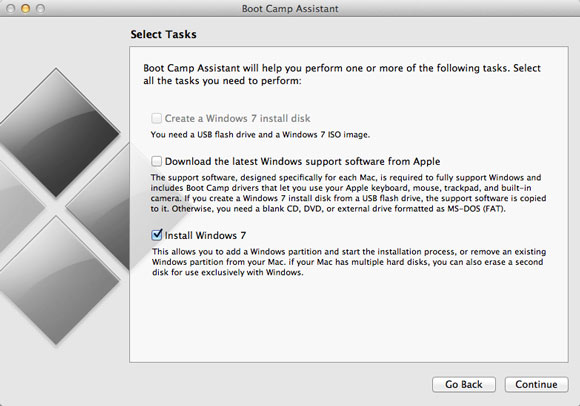
Step 3: Choose Install Windows 7 under Select Tasks screen and you also should select the option Download the latest Windows support software from Apple.
Click on Continue. The option will turn to Remove Windows 7 if you have already had a Windows version on your Mac, so you must be careful.
Also remember to save all drivers for later use.
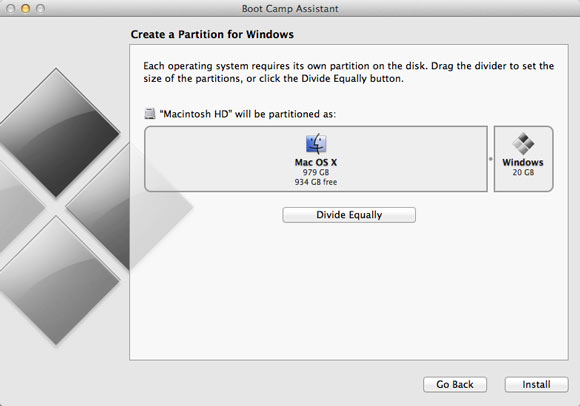
Step 4: Now you can create a new partition to install Windows 8. Drag the divider to set the size of the Windows partition, it should be at least 20 GB.
Step 5: Insert the Windows 8 USB or DVD into your Mac and hit the Install button available inside the Boot Camp Assistant wizard.
Step 6: This will start the familiar Windows 8 installation process on your Mac. You just need to choose the disk partition “BOOTCAMP” to install. If you have an issue requiring to install into a NTFS partition, just go to advanced Drive options and hit the F key to format that partition to NTFS format. Then you can follow the process and use the provided product key when prompted.
After finishing, you can switch between Windows 8 and Mac OS by holding the Option (Alt) key at start up.
Step 7: Now you should be able to log in to Windows 8. The final step is installing all drivers you downloaded in the step 3 (in Bootcamp folder), it will help Apple mouse, keyboard, trackpad, USB, networks work properly.
Have fun using Windows 8 on your MacBook.
Terrance says
I got trackpad to work. Great
I will call it a day. Success. Just have to know when the machine will
hang, stall, crash or just not respond.
Windows 8 has potential for me on Macbook, getting closer to opening package.
http://maxcho.com/2012/08/windows-8-on-a-macbook-pro/
_____________________________________________
Windows 8 on a Macbook Pro
Having trouble getting your trackpad to work on Windows 8 RTM with your Macbook? This fix worked for me, via LeeR @ ArsTechnica.
Right Click | Update Driver Software | Browse my computer for driver software | Let me pick from a list of device drivers on my computer
I then selected USB Input Device. (It was the only other device in the compatible hardware list).
Doing this for each one restored basic mouse functionality. No multi touch at this stage, no right mouse click.
After that I did the following:
Right Click | Update Driver Software | Browse my computer for driver software | Let me pick from a list of device drivers on my computer
I then selected the relevant Apple Multitouch driver. (This again was the only other device in the compatible hardware list).
and it works.
You might need to go into the Boot Camp Control Panel and tick boxes in the Trackpad tab to get things back how you wanted it.
Tuan Do says
Wow, that’s awesome, Terrance.
I can’t believe Windows 8 somehow still works on your MacBook although it is not good as it is supposed to be. I haven’t seen my laptop freeze or hang since installing Windows 8 and it seems happening very often on your machine.
By the way, if you plan to install Windows 8 Pro on your MacBook, could you do me a favor? Please send me an email listing all issues you have when and after you install it, and any fix you have as well. I’d love to feature that article on this site as it will be very helpful for other people. Of course, all the works are credited to you.
Thanks in advance.
Terrance says
Sometimes I feel I am reinventing the wheel as I am sure the issues
I am having have already been addressed. If you feel there is anything
new I have listed, then fine. From the start I had an issue with the
.ISO file. Really it would have been nice to have the Preview disk directly
from Microsoft as I tell clients it is beneficial for them to have the
original installation disks and not depend on downloading files that
could get corrupted or be incomplete (wireless or wired downloads)
let alone slow.
I am not sure about getting credit as I am doing this for my own benefit
and I truly want to make Windows 8 work for me.
I have found that to me it still lags, but I do type too fast. Sometimes
the scrolling seems to lag still, but it is early yet.
I may have to do this all over again and just install as you say the proper
way and not depend on Preview and just use the still unopened package I have.
Let me figure out that error code first and hopefully the machine will
not freeze up again once I do. I am not even sure it is freezing up because
I am using the wireless adapter or what.
Or when it freezes or I think it is not responding, maybe I should be patient
to wait for it to recover? I am not sure.
I am typing this using Windows 8 the screen part right now (not using
desktop mode). So let me commit this before…
Thank you.
Terrance says
I am getting error code 8007065E when attempting to perform updates.
Also for the trackpad, I cannot seem to right click to get the cut,copy,paste
menu and have to use the external mouse. Maybe it is a simple setting
but I do not see trackpad option or menu button as I did with Windows 7
and using boot camp.
So that is about it. I will just wait for the machine to freeze now…
Ta ta… let me send this now before…
Terrance says
Things are improving. I have been on Windows 8 side without
it hanging or freezing for a while now. I should have timed
it.
My only issues are
1) Track pad setting how to right click bottom of pad to
select Copy, Cut, Paste… so far using mouse.
2) Google Chrome scroll bar is lagging
and this has nothing to do with Windows 8 but my google
chrome browser has turned dark and I am not sure what
I did to set this if by accident. It is a bit annoying.
3) I cannot seem to get rid of the Windows update errors.
I going to try disk cleaning and using Norton Utilities
to perform a registry clean to see if that improves
things.
But I am not seeing any problems …let me send this now
as you know why…
Terrance says
I am afraid that something got corrupted or perhaps not completely downloaded
as I was attempting to perform one of those Windows updates after installing
Windows 8 Preview. I think that first or whatever crash may have “damaged”
something and why I cannot go forward with subsequent Windows’ updates.
See that error code. Maybe this is causing my machine to not respond.
I just was on Windows 8 and it stopped responding and I was a bit disappointed
and I really want to get this taken care of. I will try to research that error code
and see if I can repair my Windows 8 since you state you are not having such a problem.
In the worst case I need to start this all over again. Put a fresh copy of
Windows 7 Ultimate on and try again. At least I know how to get trackpad going
and some other things if I have not forgotten.
I just had some spare time even after voting and helping with some
family shopping to do this. Let me take a little break and figure out what to do
(like open the package). I am sorry if I am wavering on this but I do have
another 20 or so days left to return.
This is the thing, I kind of want to try this on the Sony just to see if the
touch screen monitor will work. But I can even try this test using the Macbook
if there is some guarantee that those Thunderbolt to VGA/HDMI/DVI adapters will
work and I can swipe my fingers across the screen and touch and get results.
Terrance says
I meant something got corrupted as I was performing the update the
computer stalled and I believe crashed and perhaps a windows update file
is not complete and preventing updates now. I tried to do a restore and
that is not working either. Some things have changed and I have to
keep hitting Command (Windows star thing) X to get to like the Control Panel
to do old windows stuff.
The store gave me a list of all the commands and short cuts and key presses to
do things within Windows 8, but I cannot find it now.
Terrance says
I am getting other error update messages, but I am attempting to
run the Windows Update Troubleshooter in Administrator mode.
Some seem to have corrected themselves and others have not.
In the end I may have to reinstall everything and start all
over with Windows 7 then upgrade. Do I really need to update
Windows 7 to service pack 1 or whatever and apply all those
updates taking up time or can I go straight to Windows 8
after a new, fresh Windows 7 install.
Thank you.
Terrance says
Well I don’t know, Windows 8 seems a bit inconsistent as now I cannot
get to Windows Update, the Control Panel part freezes. I cannot right now
proceed to check the updates and get to that error code again so I can
fix that. Maybe something got corrupted as the update was performing and
the computer crashed in the middle of it.
I still see typical erratic Windows behavior, lag, scroll on Chrome browser
not responsive at first….
I still think Windows 8 has great potential … it is kind of a better Windows 7
at least (kind of like C++ was used as a better ANSI C).
So maybe I will just reinstall everything and use the source disk.
Best Buy has that touch screen monitor from Acer for $500 and the agent
told me of its generous return policy.
Terrance says
I think I will open the package and reinstall .
I will reinstall Windows 7 but do I have to go through all the updates
and Service Pack there before installing or upgrading to Windows 8 Pro?
I think I need to do a clean install as things are not responding like I had hoped.
I even tried to create another account with Administrator privileges and that
hanged when attempting to log in.
Now if I can do a little consulting task for a client and I will charge
only about $41 to offset the cost of buying the Windows upgrade package
I will break even and be happy just like I did when I charged a client
for Vista upgrade and virus protection issue the cost for the recent
Mac OS Mountain Lion upgrade. Is there any other way to be compensated?
Tuan Do says
Hi Terrance,
Microsoft said that we can upgrade from the release preview to Windows 8 Pro. I suppose you don’t need to roll back to Windows 7. In case you reinstall Windows 7, you will have to do all the updates again.
Terrance says
Thank you. It is just I am not sure if the Preview release is corrupted
and I guess I will update to the purchased copy, but that would just
require entering the product key, right to get this official.
I have had bad history with Windows in the past and thus why I was so
cautious. I kind of feel this Windows 8 could work out for me and who
knows I might try to secure another copy.
It might be worth it to make sure and put a fresh copy of Windows 7 again,
do all the updates (I will go to my alma mater college for highest speed
connection) and put a fresh copy of the official Update Windows 8 Pro
as I can *trust* it now. I say this for one reason, the bluetooth connection
link to my stereo headset (headphones) worked immediately whereas with
Windows 7 on boot camp there was a struggle with Broadcom drivers.
The headsets are Creative WP 450 and Logitech H800.
That alone is worth me keeping Windows 8 for Macbook
I am still curious about the touch screen monitor and I may get one just
to test either connect to Macbook as external monitor using thunderbolt
adapters/converters or I will determine which Windows 8 to put on the Sony
(trial, preview or bought copy update) to connect touch screen monitor there.
Thank you for pointing me to the Preview so I could convince myself to keep
Windows 8. Now I probably should have just opened the package from the start
and I would not have had been blocked by a corrupt or incomplete download .ISO
file.
This is the importance of keeping an official copy of the operating system on
some “reliable” media such as CD, DVD the silver kind and not depend on
downloading via wireless or wired connection (which I did the latter).
I have some work cut out for me the next coming days… the weekend is near.
Terrance says
The weekend is here. I still have not opened the Windows 8 Pro Upgrade package.
I was trying to repair the Preview one with the Windows updates and getting error
codes. I did something for Update Regeneration (look online). I got the Update
to stop hanging at least after I executed some steps to reset everything.
I am still getting some error codes in the update steps and maybe this is a
restriction put out by Microsoft for this Preview version and it wants me to
finally commit to using the official disk. I am close to it.
Update: I got the trackpad going with the bottom right click. I had to run another
Boot camp list of drivers the multitouch track pad one as I had only excecuted
the trackpad installer and had to go in the Devices and settings to update
the driver in the hardware list (I found online).
Overall , minus the issue with the Windows Update possibly being corrupt,
I think Window 8 is working fine on the MacBook. I was able to remain connected
using wireless connection for a while until I got tired of the update issues.
I just think I may need to do another clean install and make sure my downloads are
not corrupt transferring over the internet and that the machine does not freeze in
the middle of one and an update. All else seems fine.
I have a pretty reliable internet connection with Comcast, but I think if I do this
again, I will go to my alma mater (Illinois Institute of Technology) and get wired ethernet
there for a better and faster internet connection. Or I could choose some other
academic setting.
Terrance says
I also have an urge to get that $500 touch screen display
just to see if I can connect the monitor to the Macbook
using the thunderbolt to whatever connector (DVI, HDMI or VGA
as I have all three) to see if I can swipe my hand and touch the
icons. Hey, it’s only money, but it would be better if I was back
in the industry (AT&T, Lucent, Motorola) to make the big $
but they don’t seem to like new-hires and lay them off so easily
and not assist in finding alternate employment and it seems
as if I am begging for a job when I go on these interviews and I should
not have to given the 10 years I did put in before I became disabled.
Terrance says
I am sorry for my comments: I made a mistake. I was laid off from Telelogic
which was consulting for Motorola… I left out Telelogic for some reason
as I was laid off that one within 9 months and with no assistance to
return to a job left or to find alternate work within the company. Now Telelogic
is a part of IBM which recently, after some major struggle, sent me my employment
records archived as Telelogic no longer exists.
Terrance says
I decided to wait as this past Friday, my cousin’s son put the Windows 8 Pro
Upgrade Preview on his Macbook. With a little assistance from me (having
the drivers for Windows Support –I forgot I had the DVD with me so he had
to mount his own .ISO file but was there to verify the download was complete
and not corrupt), he was able to successfully install the upgrade. The only
issue was the trackpad did not work and he used my flash drive with the
TrackPad drivers to fix that. What was left was whether he got the bottom
right click to work as it was nearing his parental curfew and we had to
rap things up as we had accomplished a lot to get things going for him.
So I will be in touch with my 2nd cousin to see if he experiences the same issues
with the error codes I am seeing after the downloaded upgrades. If he experiences
the same issue, there is no need start all over, even though I may do so anyway.
If he does not see any errors then it means that I was just unfortunate to experience
a computer freeze as an update was being applied and I will start from scratch.
Overall Windows 8 has been quite good apart from not being able to perform this
last update. It works well with the Macbook and did not crash. I was on for 6 hours
until a proper shutdown.
Although I still see some quirkiness like in Windows 7,
I give thumbs up to Windows 8 Pro on Macbook based on the ease of linking 2 of my
stereo Bluetooth headsets that I had more difficulty in Windows 7 on the Macbook
only.
Terrance says
Well I guess there is no more to do. I am successfully using
Windows 8 Pro Upgrade Preview on the MacBook. I am happy with it
so far.
I still see some quirks that were in Windows 7, “not responding” messages
and Google Chrome browser seems a little slow when scrolling and I am
still seeing some trackpad issues when doing a remote desktop into
a Windows 7 computer. Those issues are minor and I am using Windows 8 more
as it is not freezing the computer anymore.
I am not sure about this talk about purchasing Windows Media Center,
but I am currently playing a video using Roxio Creator Pro CinePlayer.
I still have not opened the Windows 8 Pro Upgrade as I decide which
computer to put it on and I will wait until the Preview expires before
I make the next move on the Mac.
Success I think. I am happy with this, surprisingly.
Thank you for your assistance.
Tuan Do says
Yeah you can get Windows Media Center for free after you upgrade to Windows 8 Pro. Here is the link: http://windows.microsoft.com/en-US/windows-8/feature-packs
The preview will expire in 2 months, so you still have a lot of time to experiment.
I’m not sure about the brightness as it looks great here. Do you have this problem on Mac?
Terrance Curry says
About that brightness issue. I decided to reapply the boot camp drivers.
The monitor became bright again afterward. But later it dimmed again.
So I will fiddle around with the Mac downloaded drivers from boot camp.
It is a minor issue given the overall success of installing and using
Windows 8. I and maybe others started off with low expectations of its
compatibility on the Mac. However, I believe it has met and even
exceeded expectations (reminds me of my job performance appraisals at AT&T/Lucent
ages ago — now “retired” not by choice but by lay off as company did not see
the value but an expense (new-hire) that needed to be eliminated).
Have a good day.
Terrance Curry says
So far things are still going well with Windows 8 on the MacBook.
My only issue now is it seems the updates are working fine or better.
I did not see the error message; however, after some 9 security
updates just a few minutes ago that were downloaded and applied,
the reboot or restart took too long. Actually restarting always seems
to take too long. It is better for me to shut the computer down
and restart (and not forgetting to press the Option key going to Mac side).
I am not sure if the restarting hangs are due to that prior machine
shutdown or freeze during an update.
One other problem is that when the machine boots into Windows mode
in that first screen to enter PIN or Password, the keyboard is not lit
and it seems the Function key to activate the keyboard light brightness
does not work immediately. This is only bad at night , like right now
as I work late on this (production support memories at AT&T — 3 to 4 AM
calls to get the system running again).
Well thank you. I am not sure why I am posting here anymore because
I do not see too many major issues porting this Windows 8 to the MacBook.
I am this close -> || <– to opening the Windows 8 Pro Upgrade package
still sealed. I may wait until this Preview expires…
Terrance says
Everything or most things are going well.
The only issues I have are
Chrome browser sometimes hangs when I attempt to scroll down or it is not as
responsive as I would like. I have to minimize the window or go somewhere else
then come back to the browser and the bar has been scrolled down and I can
control with the mouse again.
I find it a bit difficult to get to the Search, Settings, Devices, etc.
menu on the right side as you swipe your hand over to the right.
It is a little frustrating as it seems to be random how I do eventually
get to it. I think I mastered how to swipe finger down to the left
to get to the Start menu and right click down to get to the All Apps
I kind of miss the Start->All Programs->
I find the applications in the Start window (Windows 8 mode) to be
a bit cluttered and they are categorized but I would prefer all the
applications to be in alphabetical order as before with Windows 7.
I just have to navigate the different categories and I have not
memorized them yet.
The screen keeps dimming, who knows. It is fine now as it is daylight
but at night who knows? I guess we are to do our work during the day
(or I did so before I was laid off from Telelogic/Motorola rare instances
work done at night, overtime) so this is all for naught.
Now, I may want to do something else when I reinstall everything and
start fresh. I want to put Ubuntu Linux on the Windows partition on the
Macbook. I think I can pull this off and if I do, I would have 3 operating
systems on the Macbook. I know with Windows 7 there was that Windows
boot loader and execute the Linux operating system within the Windows
environment to install on a blank Windows or allocated partition.
I am thinking to try the same thing here next time. I just have to juggle
with the hard disk partition sizes again. I gave 150 GB to Windows 8 so
only 20 GB is necessary, I guess I can divide that up …100 GB for Windows 8
and 50 GB for Ubuntu as I think Ubuntu needs 10 GB.
Terrance Curry says
Okay, I am blocked
I cannot seem to add my Brother MFC 9970CDW or other brother
network scanners. I was able to connect the printing.
I can scan using the USB connected and thought that would
somehow keep the drivers on the machine. But once I unplugged
the USB and went back to attempt scanning via network, I get
errors and it cannot find drivers. Brother does not seem to
have anything in place.
I hope I will be able to network scan again like I did
using Windows 7. I even tried downloading the Windows 7
drivers and software for the printers from Brother and
I get an error message saying the drivers are incompatible
as it detects Windows 8.
Terrance Curry says
From Brother on network scanning in Windows 8
John: Thanks for your patience Terrance. Scanning over a network connection is not supported using the built-in drivers supplied with Windows 8; you will need to connect the MFC directly to your computer with a USB cable to enable scanning. A Windows 8-compatible version of the MFL Pro Suite software (Control Center, PC-Fax sending/receiving, network scanning, etc.) is currently scheduled for release in early march for the MFC-9840CDW and early February for the MFC-9970CDW.
Tuan Do says
Oh what a shame.
So you will have to wait for more 4 months to get the driver? They should start working earlier to catch up with the Windows 8 release.
Terrance says
Well I will see if I can connect the printer USB to my
router (Cisco Linksys EA4500) and try to use the printerserver
capability. I am not sure if the scanning will work that
was as I never tried this. I only connected the hard drive
to that port.
Now if I can get another copy of Windows 8 Pro Upgrade at
a discount. :) and not open that one up too as the current one
is still sealed. :)
Don’t get me wrong, I am pleased with this version of Windows 8.
I like the statistics shown when copying files as I was doing a back up.
This port or upgrade went extremely well given the initial expectations.
Once I get a report hopefully from my 2nd cousin (he is not too
committed to Windows being a Mac person) about the upgrades, I may
open the box and I will do a fresh reinstall and I may try to get
Ubuntu Linux on the Windows partition if Windows 8 will allow that
as Windows 7 did.
If you have any thoughts on that as I stated earlier, please share
as I don’t want to waste time unnecessarily.
Tuan, thank you so much for helping me get to this Preview. I will
continue to use this as long as Windows will allow me then
I can open the package I have and perhaps just enter the product key
if I do not reinstall everything first and start fresh. Time on my hands.
Take care all.
Terrance says
Of course another way to possibly scan on the Windows 8
computer is to link to the printer/scanner via one of
my server computers (Sony namely) that is connected
two ways (network and USB). Maybe I can scan via the
server computer someway. When I have time as it is not
pressing. That is why I have the Mac side, right?
Terrance says
I have a question, why is the brightness on this a bit dull?
I think I raised the laptop and the display was brighter for
a brief moment then it went back dim. I have increased the
brightness to the max but it is still quite dull.
Any suggestions?
Thanks
Terrance Curry says
I am thinking to “repartition” the hard drive on Windows 8. I have not done
this before and I may take a risk, but who cares as I feel like doing a
fresh install anyway.
What are your thoughts about shrinking the Windows 8 partition and perhaps I
can allocate the other to Ubuntu as the DVD or CD burned is ready to go
12. 04? for Ubuntu if it has not been updated recently?
So my current Windows 8 partition is 150, I may shrink it by 50 GB and
use 50 GB for Ubuntu Linux?
Or I will re-install everything and use the Windows 8 or 7 whatever to
allow Windows to allocate the size of the partition on its Mac partition
allocated area and then install Ubuntu Linux from within the Windows
environment
so
Total disk space 750 GB
(600 GB for Mac, (100 GB for Windows 7 or 8 and (50 GB for Ubuntu) ) )
Reminds me of Lisp, Scheme (recursion) (did I complete the closing of the
parentheses?)
and / or those porcelain nesting dolls.
Terrance says
I thought everything was fine with the updates. The last few yesterday worked
and were applied. However, today I am seeing an error code again.
Maybe I will shut down and try again.
Still good, I downloaded some apps : Dictionary, Intrix Traffic report
indicator, Live Mail, Wikipedia , SkyScanner, and others.
Search
Help home | Browse help | Contact support
Search results for “WindowsUpdate_80073712 OR WindowsUpdate_dt000″ (1)
Troubleshoot problems with installing updates
Learn more about common problems with installing Windows updates, and steps you can take to solve them to help keep Windows up to date.
Show results from:
Windows (1)
Search
Help home | Browse help | Contact support
Search results for “WindowsUpdate_80073712 OR WindowsUpdate_dt000″ (1)
Troubleshoot problems with installing updates
Learn more about common problems with installing Windows updates, and steps you can take to solve them to help keep Windows up to date.
Show results from:
Windows (1)
Douglas Intrabartolo says
Dear Tuan
It posssível copy the BootCamp partition with windows 8 of an old MacBook Pro (2009) to a new MacBook (2012)?
Tuan Do says
Yeah sure Douglas,
It is possible and the easiest way to make a clone of BootCamp partition is using the Disk Utility application on your Mac. Save the clone image on an external hard drive so that you can restore on your new MacBook later.
Hope it helps.
Terrance says
Windows 8 worked great last night and this morning. Since it is Friday, dress down day,
I will work with Mac.
I still need to test out a USB 3.0 card for the Express Card slot to see if that works well.
it connected and a USB 3.0 hard drive was connected and recognized. I started a transfer
of data but there was some hardware error and the computer froze. I will try again…
This USB 3.0 Express Card controller is not compatible on the Mac side unfortunately
or I do not think so as Apple told me but did work in Windows 7.
Nothing to report now until perhaps the next few days this weekend as I may consider
reinstalling fresh and try that partitioning thing to see if I can get Linux (Ubuntu)
on the Windows partition on the Macbook and I can boot into Ubuntu via the Windows 7 or 8
boot loader (the choice of operating systems).
Tuan Do says
Well I haven’t tried installing Linux on Bootcamp but I think there is no reason it wouldn’t work. Just backup carefully.
I remember that Linux will take over the boot loader and it could make the booting more complicated on Mac.
Terrance says
You’re right , that GRUB can take over the boot loader as I have it on the computer my mom
is using and Windows 7 is secondary (the computer she has has 2 hard drives and why
I configured it that way –GRUB the main boot loader.
It is decided, I will install it on the Windows partition and let windows deal with it as
I have it on another computer with only 1 hard drive.
So I will have the Mac use boot camp like currently to install Windows and once
Windows is on and hopefully I can partition the allotted space there into using
Windows and then Linux there if that makes sense.
Total space is 750 GB
Mac will use boot camp and reserved partitions of 600 GB for Mac
and 150 GB for Windows whatever ( 7 or 8).
Once Windows is being installed, use the Windows partition
tool to partition into 2 sections 100 GB for Windows and have an extra 50 GB.
Once Windows is established , I run the Ubuntu now 12.10? wubi.exe file
within Windows and let Windows use its boot loader and there will be a choice
of Windows and Linux and put Ubuntu on the 50 GB reserved space.
Ideally that sounds right.
The back up has already been done so that is no issue there , just there could
be only an inconvenience if something goes wrong. :) The data are backed up on
the Mac twice even as I usually do a mass copy of the important data areas and that
is on some Blu-Ray or DVD or combination already in addition to an old hard drive
for the Time Machine back up I did recently. Redundancy, maybe costly overhead
but it is better to be safe than sorry.
Thank you so much and for the reminder, Tuan.
All have a good weekend.
Vincent from Computer Tips says
I have installed 90 days trial version of Windows 8 Enterprise Edition on my MBP. Is there any way to convert it to Win8 pro? I wish I could download win8 pro from somewhere, I would try installing on my iMac too.
Tuan Do says
Hi Vincent.
You can try installing the Windows 8 Release Preview. Download links are given above somewhere in my comment. Then you can try it on your iMac before upgrading to Windows 8 Pro.
Terrance says
I think I saw a video how to install 3 operating systems on the MacBook.
what I noticed about one of those was that they reserved putting Linux/Ubuntu
on the Windows Partition perhaps using bootcamp somehow so my idea of
have 3 operating systems showing after hitting the option key may not be ideal.
So the option key will show Mac/Os and Windows and the Ubuntu is installed
there either by Windows environment or somehow boot Ubuntu and let it install
its GRUB boot loader on the Windows partition separate from the Mac as not
not corrupt the Mac/OS partition. Let Ubuntu/GRUB affect the Windows part
and that seems fine with me.
When I get to it, I will just have to repartition everything I think using
Windows initial install process and get a calculator to size things right.
Maybe I will both Windows and Ubuntu partitions equal size of 75 GB each
and be done with it.
Other than that, nothing eventful has happened with Windows 8 except
I was able to install a Motorola Bluetooth USB dongle where I had problems
installing on a Windows 7 machine (Sony) (bluetooth drivers conflict
that seemed easier to install in Windows 8 on the Macbook).
Because of this, I may advance the installation of Windows 8 on the Sony
very soon.
Terrance says
Google Chrome problems?
Is it just I or is anyone else having lag with using Google Chrome
in Windows 8? I have uninstalled it and reinstalled it and for
me, maybe it is just my bad luck like keeping a job getting laid off
in 4 to 9 months, the browser seems sluggish, non responsive to
when I attempt to scroll up or down and sometimes hangs when attempting
to navigate to a website.
Solution: I just have to minimize the window and bring it back and
it seems to fix the problem.
OR I just go to another browser if I am impatient and need to go to
the website immediately… This is why I keep 7 to 8 browsers handy,
when one crashes or gives me that “Not Responding” message, I just
don’t have time for that …. and I go to the next browser to get
work (or so I think this is) done.
Thank you, it seems no one is responding to me due to my verbosity…
It happened at work too… either I covered everything on the project
issues and there was nothing more to say, I was asked to move to the
next project as no more issues with the current or previous one.
I probably caused my own downsizing or lay off as they did not need
me as everything was done and no questions needed to be asked of me
afterward.
:)
Terrance
Tuan Do says
Hi Terrance,
Actually I see you are verbose but with great expertise. It is not easy to find those knowledgeable people nowadays. :)
Btw, I don’t have any issue with Google Chrome on Windows 8. I am using it as my primary browser since I upgraded to Windows 8.
Terrance says
Okay, I will try better with Chrome. I just experienced the problem
again. For me it does not seem responsive for a moment and I keep
clicking and nothing happens until I realize, oh I need to minimize
this and bring it back and all is fine as I am using Chrome now
to send this message.
I feel comfortable with Windows 8 to finally open the package to install on
a Sony machine. It has been sealed this long I find it hard to open it
as I continue to look at its shiny plastic.
Tuan Do says
I think you can open the box now.
In case you are not satisfied with installing Windows 8 with BootCamp, you can try it on a virtual machine. Most of them are fully supporting Win 8 now.
I wrote a guide with Vmware Fusion and it runs well on iMac. Check it out: http://techwalls.com/news/install-windows-8-macbook-vmware-fusion/
Terrance says
Oh I am so sorry, I lost focus. The purpose here is to talk about
Windows 8 on a Mac product . So I will add …
I feel comfortable to officially install a Windows 8 on the MacBook too
or rather use the product key to activate officially another Windows 8.
As far as using VMware, forgive my lack of knowledge on this, but that
would require me to purchase something else like for parallels?
Or perhaps some of this is free software. I should read through your articles
but for me I keep it simple for myself and just use boot camp.
I just have to remember to press the Option button as I keep Mac/OS as
the primary operating system and I tend not to use boot camp to toggle the
mode between the two (Mac and Windows).
I only wish there was a boot loader screen like after you hit the
Option key that would boot into and give you that choice (like with
Windows boot loader or GRUB for Ubuntu/Linux).
So just tell me this: VMware is free? I don’t want to get it confused with
parallels that costs and I had thought that was supported somewhat by Apple
but was told I believe it was no longer sold at the Apple store.
I may also need to get a copy or buy a copy of Apple Remote Desktop
if that could be of use to remote log in to Windows-based machines.
For me sometimes the RDC (Remote Desktop Client) seems to hang.
Terrance says
Okay I went to the link you provided and it went to Amazon to purchase.
For now, I am satisfied with boot camp and do not think I need to spend
more money on this ( or maybe I could consider asking a friend who could
be a sponsor of sorts ). These things are for those who are really in the
industry as I am just a home user and not in the fast paced technical
computer field as done long ago (put -forced- out to retirement).
Thank you.
Tuan Do says
I’m sorry for that. There is another virtual machine app that you can use for free on your Mac. That is Oracle VM Virtualbox. Some people installed the Windows 8 Release Preview successfully on Virtualbox but I am not sure about the Pro version.
If you still have issue on your Macbook, you can give it a try.
Terrance says
Nothing much new with Windows 8 over the holiday.
I saw something to get was it Media Center for $9.99.
I guess I should get that, right? I was able to play DVDs using Roxio
and some other software. I might want to see if I can tune TV and radio
stations with one of my Hauppauge, El Gato or Pinnacle TV/radio adapters
running Windows Media Center (Pinnacle and Hauppauge have their own
software that ran under Windows 7) and that is about it.
Tuan Do says
Hi Terrance,
If you have upgraded to Windows 8 Pro, you can upgrade it for free. I posted the link somewhere above. I don’t play DVDs much as using video streaming services is more convenient and cheaper for me, so I almost do not use Media Center at all.
There were some good deals I found in the last few days, such as the Parallels app for free (with rebate) or some Windows 8 machine. Unfortunately the Microsoft Surface is not included.
Terrance says
Oh thank you for the reminder that it is free. I think I saw something pop up that
advertised I could get something Media Center at a cost of $9.99. The reason why
I did not click it was that I want to reinstall everything on the Sony machine
as I was still having issues with the Bluetooth. So I want to, when I have time,
perform a restore of the OS on the Sony, probably it ran Vista before I added 7 to
do the Windows 8 update. Once I get the bluetooth things either deleted for the old
and added for the new or perhaps I will upgrade to Windows 8 again and try
again.
Also I am looking for a touchscreen display that is affordable: I have a few leads
that I want to try out before I consider reinstalling everything and starting fresh
and new. (Time on my hands).
And about the Macbook, I am letting the Preview play out and I will get to making
that official when the time comes. Also if I have time, I may reinstall everything there
to make room for the extra partition to somehow add Ubuntu Linux on the Windows
partition (either use Windows’ Boot Loader -easier- or GRUB — I have to research and decide
which is better).
Thank you.
Terrance says
I have used the Mac side for most of this week and Windows 8 on a Sony
I am revamping.
Even though my cousin, I mentioned in the aforementioned comments, may not
be impressed with Windows 8 on his Macbook, I am alone again with this
in regard to the updates that are giving error codes I mentioned.
I am still using Preview
and maybe things will change once I activate the product key (in time).
Just a question, I guess it is obvious I cannot get this free
Media Center until I have activated a valid, purchased key as I tried with
using the original Preview key and it did not seem to work.
I was trying not to open the other Windows 8 package but benefit
from and explore Windows Media if I can.
But if you feel I can use Windows Media Center in the interim before
applying a purchased product key, let me know , even if you do not
seem to be a fan of it.
I can play DVDs using some other software (Roxio and I think MyDVD).
I would be interested in Media Center to test out the TV tuners
I have to tune in television stations and radio stations (FM).
(ElGato and Pinnacle support both TV/Radio and Hauppauge with TV).
I have too many devices (unnecessary redundancy).
As for the Sony, I was having some problems with a USB Bluetooth
adapter I want to add (cellphone works and transfers data, but
stereo headsets are not working even after being paired).
So my plan is to erase everything on the Sony and start all over
using the recovery partition and put the computer back to
factory settings (probably was Windows Vista before I installed
7) — then I will upgrade again to Windows 8 Pro from there.
After that I can download the free Windows Media Center (if it is still
or it is $9.99).
I am trying to secure a touch screen monitor too and for a good price
(I have some leads and for under $400 if not under $300)
and I will be pretty much done with this and will be satisfied
with Windows 8.
Tuan Do says
Hi Terrance,
I don’t know any way that you can try the Media Center before upgrading to Windows 8 Pro. Grab the key soon because the offer will expire in January.
I believe you should upgrade on your Sony instead of Macbook. There are still some issues running Windows 8 on Mac.
Terrance Curry says
I agree. The thing is I did not want to change the topic here in
focusing on the Sony too much as the focus of this forum is for
installing Windows 8 on some Apple/Mac (Macbook) Product.
That said, I did open one of the Windows 8 Pro upgrade packages
and used the product key to install on the Sony. I am sure I can
add Windows Media Center here and thank you for that deadline
I think I saw that and said I have time. Right now I want to
revamp the Sony back to factory settings to see if it resolves some
minor bluetooth issue I am having pairing with some headsets.
But really, since it is being used as a desktop replacement (stationary
server), why not just get corded headphones and be done with it,
really? I complicate things for myself with these things.
I just like to try to get everything that can be added, connected
to work (like I do not need wireless on this computer as using
ethernet LAN is sufficient).
So in the coming days I will restore the Sony (back to Vista?) and upgrade again
to Windows 8 and hopefully it will go as smoothly as upgrading it
from the Windows 7. I hope I do not have to call Microsoft to use the
same product key after the fresh install and subsequent upgrade.
Once the Sony is in working order, then I will download the free
Windows Media Center on it.
I just wanted to try Windows Media Center on the Macbook while it is
still running the Preview version and that may not be possible.
I have to revamp that too on the Macbook as you recall I want to add another
partition (Windows side) to add Ubuntu there (perhaps using GRUB on the
Windows partition or let Windows boot loader take care of it, but it could
be more challenging (a risk taker) doing it the former way (Ubuntu/GRUB
take control and it will see Windows as the other operating system
like I have it on the computer my mom uses with Windows as the default in GRUB).
Thank you for your advice and warning of the deadline for this free download.
Oh you said expire in January, I thought I saw January 31st ,please confirm
unless it is January 1st? I had better get a move on it as December 1st is
in a few hours.
Terrance says
Touch screen works great … had to do nothing but
connect to Macbook.
The Sony is out of commission, did something with Windows 8
like powering down or hard shut down several times may have
messed up Windows 8. It went to some repair or recovery
and it can’t repair. I am reinstalling the original OS on the
Sony anyway so no loss (data were backed up well prior to this).
It is a matter of losing time. I will get to this later.
I will try to install a spare Windows Vista and go to 8
from there.
Back to touch screen, I have the Dell one for a fair price under
$300. What more can I do apart from restoring the Sony? and
applying a bought product key to officially activate Windows 8 on
the Mac? I am not having too many issues on the Mac that you
stated? Can you share any problems that I am not seeing now
other than the minor update problem? I am over the Macbook
crashing, rebooting suddenly or just hanging. I am not experiencing
this behavior in a long while. I kind of like Windows 8 on the Mac.
Terrance Curry says
Well, there is a possible added bonus with Dell touchscreen
monitor on the Mac side. There is some connectivity or
response when I touch the screen in certain areas but a bit
more difficult than using it on the Windows 8 side.
I did not expect this much touching the screen on Mac.
So , is there compatibility on Mac with this touchscreen
from Dell? Dell ST2220T
Terrance Curry says
I did not state why I was impatient to shut the Sony down
the proper way. I was communicating with Sony as to perform
a restore using the recovery partition on the drive. Sony said
to press F10 and after a few missed attempts of the computer
being rebooted into Windows 8, I thought my time with the
Sony support was limited and timed and I had no time to wait
for proper shutdown to start over. So I did hard resets, power off
to start over to hit the F10 key in time. Maybe F10 puts
the computer into a Windows 8 recovery or repair mode?
In any case, maybe, since a friend gave me this computer, maybe
that partition was damaged or erased as I could not perform a
recovery. However Windows 8 seems to be stuck and I am not sure
if that is a problem to be investigated further for those who may
not shut down their computers properly using the hard shutdown
process.
I was going to reinstall or attempt to recover back to Vista (I learned
from Sony who looked at the specifications on the 2008 computer
and it is out of warranty– I thought I would take that angle
to no success :) ).
There can be some more use out of this computer still once I get the
optical drive to work consistently and the OS reinstalled. The Dell touchscreen
monitor is waiting once Windows 8 is back and running. meanwhile the touchscreen
is wonderful on Windows 8 on the Macbook. I just have to get used to some
finger and hand motions on the display. I am learning. And so for a mere
$300 (touchscreen) $40 (Windows 8), I will have an updated machine potentially with
touch screen capability.
Is that a good deal?
Terrance says
Success!!
After having some issues with shutting down
Windows 8 on the Sony as I was trying to deal with
Sony to perform a system recovery back to Vista
and the factory settings using some other
partition on the hard drive– I was told to hit
F10 key for recovery that was unsuccessful &
I had problems with Windows 8 booting in repair
mode and it seemed to be in a loop to repair or
shut down as the options,
I did an entire reinstall of Vista and successfully
upgraded yet again to Windows 8 and without having
to apply all the updates on Vista first.
I think Windows 8 gets everything, but time will
tell.
More importantly the Bluetooth adapter
I had issues fully installing and pairing with
stereo headset worked this time. As I type this
I am listening to audio on one of the headsets.
I will rest now and connect the touch screen
monitor later which I feel will be a success
since it connected so well with the MacBook
(Windows 8 side).
I do not anticipate any problems. Also on the
MacBook, I am not (or I do not think I am) experiencing any Windows 8
problems for a while — though when I get more
time, I will do a full reinstall there just to
make room and a partition to accommodate
Ubuntu Linux on the Windows partition and leaving
the Mac partition in tact.
Please share any problems I am just not seeing
ever since the computer freezes ages ago and I have
forgotten about…
Success indeed!
Terrance says
I just tried to get a key for Windows Media Center and I am not
getting one sent. I will check again. It did say the key could
arrive within 72 hours. I hope I processed this properly
as I am expecting an email containing a product key for WMC to
the email I am using for the Windows 8 installation (one of
my 4 Hotmail and sister accounts-> Hotmail, msn, live and outlook).
I thought I could activate something by using the product key
given with the Windows package.
Tuan Do says
Congrats, Terrance.
Finally you can enjoy Windows 8 Pro on your laptop. I am still not a fan of touch screen desktop or notebook. Some recent research shows that suspending your arms in mid air to touch the screen can cause the mess like carpal tunnel syndrome that many people got when using mouse and keyboard improperly. I’d never follow something that could affect the health.
Regarding to the Media Center key, I think you will get it soon. I received the key just after 1 day. :)
Terrance says
Of course I am still using Preview version on MacBook and that could
soon change.
I have the full version Windows Pro on the Sony and in time I will move
the touch screen monitor there.
All I need is that product key whenever it arrives, I am waiting considering
I executed the request correctly — or I will try again.
I have a Hauppauge TV/FM tuner (HVR 1950?) connected USB to this computer (Sony)
and want to see if Windows Media Center can tune TV and FM signals like I did
under Windows 7.
As far as the touch screen, I can return it within 30 days but I guess
I have updated (revamped) the Sony at least with this technology as I see
some of my clients who have touch screens systems (HP, Dell) and I believe they
spent much more than I have.
Terrance Curry says
I have not received any key to activate Windows Media Center
Tuan Do says
Hi Terrance,
Probably it will take a few days. You can contact Microsoft if you don’t receive the key within 1 week.
Terrance Curry says
Alright, I applied for it again and if I did it properly
I should receive 1 or 2 keys?? and within 3 days.
I applied again last night as I connected the touch screen
monitor to the Sony and things work fine.
HDMI did not show a good picture or the screen was not
full, but maybe I should have rebooted.
Before I tested HDMI connection again, I switched to the
VGA and it shows better after the reboot.
I am blocked by not getting this WMC to test my TV / FM radio
tuner.
That’s about it.
I contacted Microsoft before and it encouraged me to return Windows 8 ,
remember? I will just wait for the full 72 hours (3 days) and if I
do not get it, I will just take it Microsoft is not serious and
does not follow through with or keep promises (kind of like the work environment
the manager (to or with a lesser degree) says your job is safe and you get
laid off right afterward and the boss survives).
Next on my list could be the Surface tablet and that should do it.
Terrance says
I received the product key to activate Windows Media Center.
All work (I may have to do something integrating Antenna Digital TV
and Cable). I may have to reconfigure (cable channels came through
but I did something and now not, but my requirement was really for
the Antenna TV channels (digital) and FM radio both work so I am
satisfied. This nearly completes my testing (Sony).
I will or may revisit the Macbook and do that all over to get Ubuntu.
Question: I was wondering if I could get another key for Windows Media
Center (not sure I can reuse what was sent) for the Preview or if
I open the second Windows 8 Pro upgrade (still sealed), since that
is another product key would I qualify for WMC product key for it
separate from the one I already have? I did use different hotmail
email address for the Macbook (live.com) (outlook.com for Sony).
I want to do this right but get as much benefit for free as I can.
Otherwise I guess I can give Microsoft $10 for their efforts for
creating a much better operating system in Windows 8. Actually others
I have encountered still have negative views and reviews of Windows 8.
Maybe I am not seeing all the problems if any, but everything is coming
up roses here in my limited environments: touch screen works, bluetooth
works, Hauppauge TV and FM tuner works (antenna and cable signals),
sound card works (Creative Sound Blaster 2 NX Audigy), what more can
I ask from Windows?
Please inform me of the problems you may be seeing that I am not now?
Well if I re-install on the MacBook, maybe I will see those initial
problems again (crashing, stalling, hanging) ? But really I have not
had those problems in a while and there is just the upgrade issue
not updating or giving cryptic error codes that I just ignore now.
Please feel free to send me email on anything I should know
or should watch out for (warn me). [email protected]
Thank you so much. I am enjoying my Windows 8 experience …until …
or maybe I just don’t know better
Oh yes, I am having problems with Google Chrome browser in Windows 8.
sometimes I try to click something else or go to another page and it
stalls, but then I have to realize, I need to minimize the window and
restore it and miraculously it is on the page I wanted it to go.
I just cannot explain this behavior even after removing Chrome and
re-installing. Just a little quirk.
Terrance says
I forgot to add, The Desktops under the systinternals Windows project
seems to work better under Windows 8 than it did in Windows 7.
So if you want to create I think up to 4 (max) desktops like one can
on The Mac, you can do so here and it seems to work better. before I had
problems of I could not stay within a desktop without it reverting to the
main one (desktop 1). You can organize your work into one or all of the 4 quadrants.
I am not sure if one can create more than 4 desktops like you can with Mac.
Windows 8 the desktop (2, 3 or 4) seems to remain static and not go back
to desktop 1 after a certain amount of time.
I am listing a link to the sysinternals website where there are other tools
for example: process monitoring, analyzing tcp/ip and IP addresses attaching/connecting
to computer (network), process explorer and other tools (reminding of UNIX)
(file system tools).
Maybe Windows 8 has integrated some of this but it can be looked into if interested.
http://technet.microsoft.com/en-us/sysinternals/bb842062
Terrance says
I spoke too soon.
I am seeing the same behavior running SysInternals’ Desktops program within
Windows 8 (desktop mode) as I saw in Windows 7 (after all the desktop mode in
Windows 8 looks and behaves similarly as Windows 7?).
When attempting to work in one of the desktops other than the first (1),
it reverts back to desktop 1. Perhaps there was something I was running
that required it to go back to the first desktop (I was playing audio files
with either iTunes or Windows Media Player and that caused it to switch
desktop from another where I was trying to run something else, maybe
Windows Media Center to watch TV).
Another problem I noticed is that when one is in one of the desktops
2, 3 or 4, one cannot move the cursor to the corner or side to invoke
the settings or Windows 8 menu to control things or see the start menu.
I have to always go back to Desktop 1 (the main one) to get the Start
menu or the click in the corner or side to see the other menus
(Settings, Search, Devices, etc.).
It would be nice to find something like Desktops in Mac or Sun Workstation
to separate applications running in different windows to help
prevent clutter. Although I did see I can extend the window and use
the laptop’s main display as Display 1 and the touch screen as Display 2
just have to move the mouse (cursor) over to the left to get to Display 2…
That seems to work and one can get to the Start and Settings menus
that way. I was trying to use one display though mainly the touch screen
as it is 21 or 22 inches.
I hope this is still on subject.
Terrance says
Maybe I will try it. I am not in the field to know the advantage of this.
Do you think it will run Windows better if I used this Oracle VM whatever?
I may have occupied (was going to use another word) my time (lots of time)
already doing this upgrade and install and for me
to consider doing this all over, there is hopefully some promise that
I will see an improvement over all? Maybe I could learn something new
but more likely it is will be like reinventing the wheel anyway.
A professor friend of mine who deals with this stuff sent me his comments on
this and I will read over those to see if it is worth my time to do this.
I will say this, the computers at a local community college running something
like this did seem to operate better with their Windows 7 environment.
It was a class I sat in on briefly for Linux and installing ?Fedora? Linux on
that. I had some install problems and got discouraged 2nd day of class so
I got a refund and had other things to do personally. :)
Maybe I can revisit this on my own time and if it is free. Now I remember there
was some mention of Oracle and you know what, I signed up for an account
there to get this a year or so back. I just forgot about it. Maybe I downloaded
something in regard to this. I may explore…
CJD says
Tuan – question for you. I see you had a keyboard issue after installing windows 8. I have the same issue – the control characters and other keys are working – except the alphabet. I am running under Fusion 5 and did an upgrade of windows 7 to 8. At first – everything worked fine until an immediate windows update – then – I had issues logging in under windows 8 as I couldnt type my password. I did some manipulating and got into the OS – created a guest account with no password and also enabled picture password. Bottom line – I can log in and out now (no password typed) and when I get into the OS – the keyboard doesnt work except for special keys. I know the keyboard is recognized but cant type letters.
Did you resolve your problem as of yet? If so – how? Thanks in advance…
Charlie
Tuan Do says
Hi Charlie,
I don’t have the problem with keyboard anymore after using Fusion.
Have you tried disabling Boot Camp driver at C:\Windows\system32\drivers\KeyAgent.sys or just uninstall it.
Terrance says
I am back to using Windows 8 Pro on the MacBook still Preview version.
I received another key to activate Windows Media Center on the Macbook
but I guess I cannot apply it as the Preview version is still running
and maybe when I apply an official bought product key on the Macbook’s
Windows 8, I can use the new WMC key.
Of course I am going or I am planning to reinstall everything on the
Macbook to make room for the Ubuntu Linux, maybe I will get to it this
weekend.
(I went to yet another computer (Dell 32bit) running Windows 7 to test a touch screen
monitor HP’s and Windows 7 was so slow and lagged. I am glad I am using
Windows 8 and Mac on the MacBook and on the Sony). I wonder if Windows 8
could be an improvement on the Dell?
Tuan Do says
No Terrance.
You can’t use that key for Preview version, it works on the Pro version only. Sorry for not replying you promptly, I am drowning in final papers of this semester.
I am never a fan of big touch screens, it even can decrease productivity in my view. Lots of people bought touch screen monitors and hardly get their hands on the screen. Just my opinions so that you won’t waste money.
Terrance says
Well if you are back… what are your thoughts on Desktops and
that suite of tools from SysInternals for Windows 8.
Initially I thought Desktops worked better without reverting to
the main Desktop #1 while in one of the other 3 Desktops (2, 3, or 4)
in the quadrant.
It was working fine but that behavior of going to the first desktop
reappeared. Maybe it is because I was running something processor
intensive in desktop 1 like WMC.
Also, please send me if you can or want a list of problems you mentioned
of Windows 8 on the Mac. I am not seeing any issues other than the
problem with update errors that does not affect performance. I still see
some old Windows 7 quirks , but that is to be expected as really this
is just Windows 7 with a shell around it?
Feel free to send me email as listed above or [email protected]
I would like to see if I can or will have similar problems, but of course
I am running this off a MacBook Pro 17″ and maybe there are different
problems or issues with other Mac products (iMac, other MacBooks …)
Thank you in advance
I am doing another back up just before the reinstall soon and maybe I will
experience problems again as described in the past but we know how to
overcome those.
Terrance says
That is what I figured. I just wanted to try using my ElGato
adapter TV/FM card and test out Windows Media Center to tune
digital Antenna TV and FM signals like I have on my Sony
with the Hauppauge BVR 1950 USB TV/FM tuner. That works so
well.
I have another $40 valued Windows 8 Pro (somehow). I have not opened
it but I am getting closer, very soon perhaps as I revamp the MacBook
and will do a reinstall of everything to make room for Ubuntu Linux
on the Windows partition.
As far as the touch screens, I guess I have 2 clients who got them
integrated with their CPUs and each one spent about the same amount
I did with both touchscreens added and they have less flexibility
(less portable). I will decided if I keep both, one or neither display.
For the prices I got them, maybe I could make > something in their sales?
But you’re kind of right, I am not really touching the screen much
but do just to continue testing. Both Dell and HP touchscreens seem
to work just fine.
Next project: Reinstall fresh on MacBook with/ Ubuntu Linux partition
(if possible) and I should be done — potentially 3 operating systems running
on the Mac Book…. Wish me luck.
Thank you.
Terrance says
Though I got behind schedule after a major hiccup with Windows 8 and accommodation
for Ubuntu Linux on the Mac, I have finally installed 3 operating systems on the
Mac.
I lost time by making a mistake (I knew better) in allowing Windows 8 to change
the integrity of the hard drive and I lost access to the Mac OS Mountain Lion
partition (boot sector). Eventually I made another change and lost access to the
main partition even after contacting Apple to do something with Disk Utility
and Command -R and who knows what else.
I won’t explain all I went through and what I did to mess things up.
Fortunately what saved me was that back up I performed late October.
I think I learned more by erasing the Mac hard drive and how to adjust
the partitions to play around with that and perhaps getting 3 operating systems
to show up when you hit the Option key. I tried but Ubuntu Linux’s Grub
was a bit complicated in this environment than on other Windows machines.
After some trials and errors and some scares initially and exhaustion/head aches,
I finally tried to install Ubuntu again on an unallocated partition under
Windows, but Windows allows only so many partitions and the space I reserved for
Linux exceeded Windows’ limit.
I got tired an I was able to have Windows 8 to reclaim the unallocated partition for
use and I decided to just install Ubuntu on the C drive under Windows. This is not
how I had envisioned (I wanted a separate partition), but it works and I am
tired of this until I have more time to explore a better way to do this
(perhaps with playing with the partitioning under Mac and the Disk Utility more).
I am now sending this from the Ubuntu environment. All work, the Mac OS is
back in tact — I have an appointment adjusted from 10AM this morning —
this afternoon as I figured out how to recover my data and the Mac OS. I want
to discuss a better way to make a flash to keep the Mac OS Mountain Lion better
and bootable so I don’t have to use the back up hard drive which saved me last night.
Most of my documents and pictures are recovered but that data are everywhere anyway,
The Mac just consolidated things more conveniently. Actually after the reinstall
The Mac found a lot of the applications and maybe a restore from the Time Machine
hard drive without me having to (or not knowing) anything.
Best wishes and Happy Holidays… I am pretty much done with my testing and
requirements.
Shawn says
Just installed Wind 8 Pro (purchased) on my MacBook Air. It will not see the wireless capability. Can anyone help?
Thanks