Blocking sites is common, be it at offices or be it at school and colleges, there are certain sites which the authorities do not want you to visit and hence they are blocked. From popular websites like Facebook, Twitter, Youtube to personal blogs, you might find a number of such sites being blocked at your workplace, your college and even in the whole country you are living in. Some countries blocking Facebook include China, Vietnam, Iran, Syria and North Korea.
Fortunately, there are a number of ways through which you may, after all, be able to browse these sites even after they are blocked. Eight such ways to access blocked Facebook and other websites are described below. These will surely help you to access any blocked site you want at your workplace or at your college.
1. Use VPN or Proxy Servers
Using VPN (Virtual Private Network) or proxy server is the guaranteed way to connect to blocked websites. This is not only the most popular but also the most secure method because they provide anonymity and security online.
They can easily bypass any network restrictions and allow you to browse anonymously. The chances of being traced back are zero due to the encrypted connections which support in preventing monitoring on the network used by you.
All you have to do is just installing the VPN program or proxy server, then you can enter URL and surf the web without any restrictions. The VPN service I recommend you is PrivateInternetAccess, they still have no competition in protecting your identity as well as unblocking censorship filters. You even can enjoy any restricted access when you go abroad, such as streaming Hulu, iPlayer by BBC, Demand5, Facebook, Youtube, P2P and more. I have a yearly subscription to this service and just need to pay around $3 per month. The price is $6 if you pay monthly.
Check out the Private Internet Access review if you are interested in the service.
2. Use alternate DNS resolution service
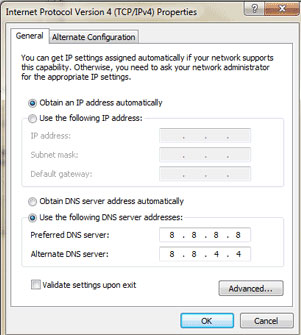
For some countries blocking Facebook in Asia like Vietnam or China, you probably just need to use Google Public DNS to bypass the restriction. Follow the simple steps:
- Go to Properties in Local Area Connection (for Ethernet) or Wireless Network Connection (for Wifi) to change the settings.
- Go to Networking tab and click Internet Protocol Version 4 (TCP/IPv4) under This connection uses the following items, then choose Properties.
- Click Advanced and select the DNS tab, then OK.
- Select Use the following DNS server addresses.
- Replace the addresses here with the IP addresses of Google DNS servers, which are 8.8.8.8 and 8.8.4.4.
- Restart the connection and done.
3. Using Short URLs
At times, using short URLs to access the blocked site may do the job. It is certainly possible that the short URL you enter will not be blocked as well hence you may easily visit the site you are willing to surf. This is a very easy method but it is also possible that you may be redirect back to domain you wanted to access. In that case, this method will not work.
4. The blocked site can also be received through emails
Services such as Web2Mail lite allow you to surf the page you want via your email account. All you have to do is send email to the following [email protected] to request to be able to access the blocked site you are willing to browse. The response to your mail will come in no time. Just remember to send in URL address of the web page you would like to surf as the ‘subject’ of the email you will be sending.
5. IP can be used in place of URL
This method’s success depends on the software which is being used. At times, only the URL of a blocked site is used for blocking that site and if you use the IP you might be able to access that site.
6. Use Translation Services to view Blocked sites
Translation services available online enable you to translate the sites from a language to another language and then the results are displayed on their own web page. All you need is to enter the blocked site’s URL and retranslate it and then the translation service will bring you the content. Google translate and Alta Vista Babelfish is such sites. This is among the easiest way which will surely help you visit any blocked site you are willing to surf.
There are so many methods available for visiting blocked sites and you are sure to find them useful. Now, blocked or not, you will be able to surf any site you want at your workplace or at your college. These methods are easy and will work for sure.
Disclosure: We might earn commission from qualifying purchases. The commission help keep the rest of my content free, so thank you!


Naser @ Tech Blog says
Thanks for these tips Sanjib. Facebook is blocked in my college PC :)
Sanjib Saha says
Hey Same here, Facebook is blocked in my college too. I use tor browser!! :)
Puneet says
This is really an awesome tip. I will love to play with that DNS thing. Thats easy for me. nice one Sanjib.
convin adapta says
i want to unlock my account
convin adapta says
some people hack my account and they give other unrecognized person request
Srikanth says
Great tutorial!! Thanks for sharing !! Actually i want to break the restriction of using facebook in my college
Tuan Do says
You are welcome, Srikanth.
I hope it worked in your college.
Arlene says
The torch browser now has a VPN setting (and is free!) It can unblock sites restricted for geographical reasons. Not sure it can help in every situation, but it does do a good job at accessing most restricted sites.
sara says
The best way to access blocked websites is to use a vpn service.
Francis says
Hotspot Shield is the best to access blocked sites. :)
Sanjib Saha says
Hi
I use HOLA UNBLOCKER Chrome extension and it works great. If you use Chrome, you can give it a try too.
Regards
Helen Duncan says
I use Astrill vpn when visiting countries with strict internet restrictions and so far I can access them.
KK Hye says
Just use a vpn service that is paid like Astrill. It works like a charm especially in these countries.