Google has announced a big change to Google Apps for Business. From now, the Google Apps for Business is no longer available for free for new customers. That means existing Business customers can still continue using the service without paying any fee whereas new customers will have to pay $50 per user each year.
There will be no change to other products like Google Apps for Education and Google Apps for Government. Google Apps for Education will still be offered for free to schools and universities while the pricing for Government is $50 per user each year. Personal Google Account will not be affected and you still can use Gmail, Google Drive and other apps for free.
Therefore, this change has impacts on Google Apps for Business only. Google explained reasons behind this decision, that they want to simplify offerings for Business and improve user experience, including 24/7 phone support, 25GB inbox and a 99.9% uptime guarantee.
When we launched the premium business version we kept our free, basic version as well. Both businesses and individuals signed up for this version, but time has shown that in practice, the experience isn’t quite right for either group. Businesses quickly outgrow the basic version and want things like 24/7 customer support and larger inboxes. Similarly, consumers often have to wait to get new features while we make them business-ready.
(Google)
This change makes sense to me because the price is reasonable and if you have a business, you can’t rely on an unsupported service. Greg D’Alesandre, Senior Product Manager of Google App Engine, brought us good news as the Google Apps Standard is still available for free through the App Engine Admin Console. However, it has the limit to only 1 user per account. The free version of Google Apps has become more limited by time. Google allowed the number of users at 100 when it is first launched, then it started dropping to 50, 10 and now only 1 single user. Anyways, a free Google Apps Standard account is still good enough for a lot of users as they just want to create a Gmail account with custom domains.
Update 2019: Now you can no longer create a free account on appengine.google.com. If you decide to use the service, you can visit this website as it is offering G Suite free days and promo code of 20% discount for the first year.
Following is the step-by-step guide on how to get your free Google Apps account for single user.
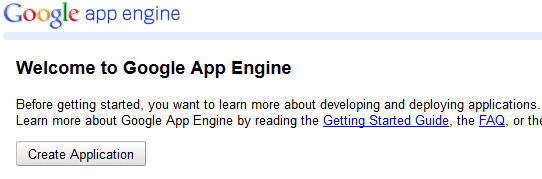
1. Login to your personal Google account at http://appengine.google.com/
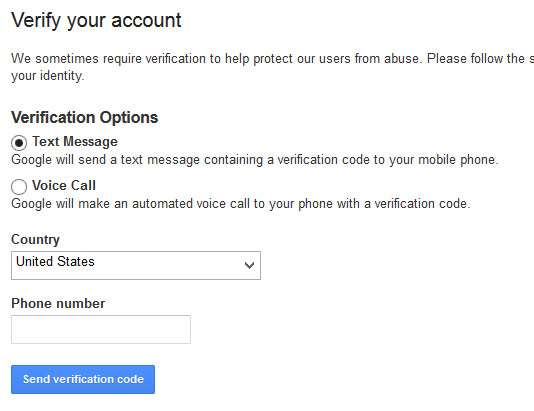
2. Verify your account with phone number.
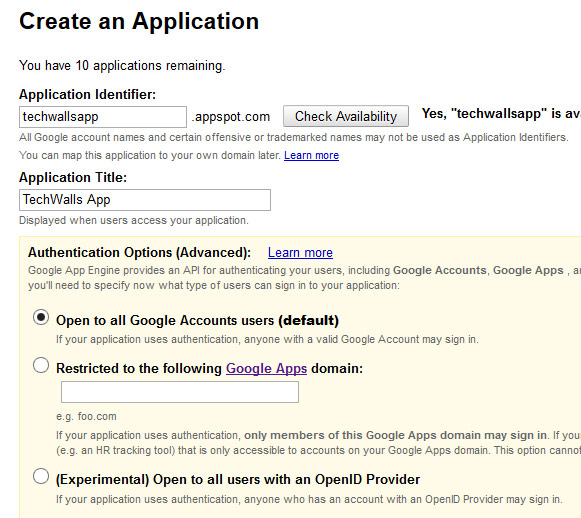
3. After verification, you will see the screen to create an application. Just get any name and fill in the textbox.
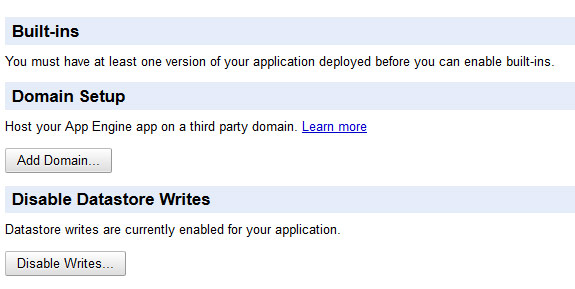
4. Then you will see your application registered successfully. Go to Dashboard -> Application Settings, find the Domain Setup section like the screenshot below, choose Add Domain.
5. On the next step, don’t care about the left side. Read the Note and you will see the link to Sign up for Google Apps Standard.
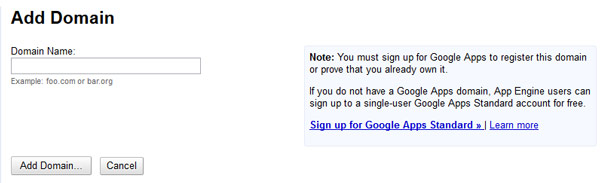
6. Now, you will see the page to setup your account. Just fill in appropriate information to create a Google Apps account for free.
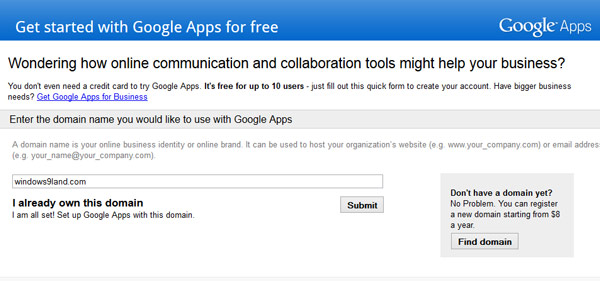
All done. If you are wondering why I didn’t post just the link to this Setup Page, it is because it will not work. You have to follow exact steps like mentioned above.
Let me know if you have any issue registering for a free Google Apps account. If you have another solution, share with us.
Update 1: Some comments below confirmed that there is a workaround to get more users for your Google Apps account. You can follow the guide above, upgrade to trial, add more users and finally cancel the subscription. Then, you will have a free account with up to 10 users. It’s worth trying.
Update 2: It seems like the workaround is no longer working and both Google and Microsoft ended the free service and migrated to the new Google G Suite service. If you need a free domain email, you can use other email hosting services like Zoho. Check out my guide to set up custom email for your domain with Zoho Mail here.
Disclosure: We might earn commission from qualifying purchases. The commission help keep the rest of my content free, so thank you!



Anuraag says
When I signup for Google App domain via App Engine It shows Invalid Request. I guess they patched it up
Hackers Arena says
At the last step When I signup for Google App domain via App Engine It shows Invalid Request What should I do?
Mandy says
Excellent article. I’m facing many of these issues as well..
Rayhaan Usman says
Hi there.
When I done these steps, I noticed that I have to pay for the Google Apps account I make. Maybe the Google system has updated?
Alpesh says
Hello Sir, My name is Alpesh Vaghela i have my own website i.e. websolution24x7.in i do all the steps from creating the ID to changing the MX record still it shows only for 30 days trial can you help me out in this matter. i just wnat to inform you that i had created one id i.e. [email protected] and i want to use it in google apps i just need this information i hope you will consider this mail & help me out in this matter
Marko says
It doesn’t work anymore. :(
Peter says
Works perfectly, until it asks for payment details for when the 30 day free trial ends.
Is there a work around for this – or is this the end of the free ride?
Parsnip says
It doesn’t work anymore..
Uri L. says
Tried it today [16/12/2013], no luck. I get “Sign up for Google Apps >>” link, directly to Apps for Business.
any suggestions?
Ashraf says
No longer working… google apps business link is there instead…
Scott says
Yeah. I followed all the steps exactly and it worked, but it took me into apps for business. You get a 30 day free trial and then you have to pay. I guess the backdoor is no longer available.
Jake G says
Tuan, I have tried like a number of users and not had success in being able to create a single user account for my domain, so I guess we assume this is no longer working. Has anyone else had success in being able to do this, or does anyone else have another work around for being able to obtain a google apps account ?
Muhammad says
I wonder if there is any way which is still free with multiple accounts?
Innovative Infoway says
No longer working. But i found my own way to do it…..
Squeaky says
Mind sharing?
Vahid says
Please share
Andy says
Hello can you share the new method or send it to my email. Thank you.
Eric says
Please share?
GOD says
@Innovative Infoway : scammer, don’t lie fuc**r
JXL says
Ha!!! Great work. I had read a long time ago this was possible but could never figure out how to do it. Thanks for this one.
Herbert says
This is very helpful… Thanks for posting!
David McCord says
Hey – thanks for the procedure, BUT — how does one get from Step 1 to Step 2 ?
I see the “Welcome” message you show for step one, but I don’t see a button that says “Verify Your Account.”
How do I get to that page?
Thanks,
D.M.
David McCord says
AND… in your example, Step 5, it says “Sign up for Google Apps Standard.”
On the page I see it says “Sign up for Google Apps” — no “Standard” is offered there.
FYI – this domain was set up to use Business Apps, and when the free trial expired, we decided we didn’t need all that and could get by with the one-address personal gmail account. All I want to do is CANCEL the business app that expired (and won’t let us log in) and revert to the free personal (“standard?”) account.
Thanks again,
– D.M.
John L says
Please tell me if I’m wrong, but I think Google has since shut the free single account down.
I have a few free Google App accounts from back in the day so I’m fairly familiar with the procedures, and I completed the steps in this article to secure another one, but it only gave me the 30-day free trial for the single account, with the warning that this account (and custom domain email) will be suspended if I don’t pay before the 30 days expire.
David, keep in mind there are two different accounts you are accessing in this article. The first account is for Google App Engine (https://appengine.google.com), which maybe you used your personal gmail account to initially access. The second account is Google Apps for Business (www.google.com/enterprise/apps/business), which you created in Steps 5 & 6. For Google Apps for Business you sign-in with whatever username and custom domain you chose during creation (username@my_domain.com). It’s easy to get the Google App Engine and Google Apps for Business accounts confused, so unsure if that helps or not. I wouldn’t imagine Google would completely lock you out of your Google Apps account, as I’m sure they are hoping for you to log back in and pay some money.
Either way, if you didn’t pay anything and your card is not getting automatically charged, then you don’t need to worry about canceling your Google Apps for Business account. Just have your domain registrar point your email to a different mail server where your mail will be configured. That will break the connection to Google Apps for Business.
Karolina V says
I was so excited when I saw this guide, but like the most recent comments confirm, there is no longer the option to sign up for “Google Apps Standard” from the screen in step 5. The link takes you directly to the now “universal” Google Apps for Business, which gives you a 30-day free trial. A disappointment for those looking to set up only a single-user custom domain…
C.P.M. Sianipar says
Please put an update box on this article to indicate that the suggested technique is no longer works while you can keep this article online.
Raja Shekar says
This Content is outdated. Kindly Update. When we follow this process, we are usually signing up for Free 30 Days Trial.
Tuan Do says
Thanks Raja,
I’ve just updated the post. You can try other free services now.
Raja Shekar says
Thanks for the Quick Response Tuan! Is ZOHO just like Gmail?
Tuan Do says
Yes, they are offering the same service.
Zoho Mail is 100% ad-free and also comes with some similar services like online office apps or collaboration tools. The Zoho app has also been released for iOS and Android. This seems to be a great free alternative for Google Apps.
Nimesh says
Domain with Active Google Apps Standard (free edition)
I have 26 domains with Google Apps Standard – Free edition (10/ 25/ 50/ 100/ 200/ 500/ 1000 / 2000 User A/C) for sale. All domains are 5-6 characters .COM registered with Godaddy.
Mr. F says
Send me info please
victor says
I’m also interested… Please send me info as well.
Thanks
Shree Sodav says
I’m also interested… Please send me all info plz
Javier says
Hi, do you still have domains for sale?
JamesK says
Hi Nimesh,
I’m interested in a 25 user domain, pls let me know how much you are asking.
And just to confirm, since that’s a deal breaker for me, can the domain I buy from you be replaced by my own domain or will it only work with the domain name I buy from you?
Shree Sodav says
this is not working for me coz i add domain so added already and open admin panel ??? plz help me
Erica Britnell says
Hi there, I bought my own domain and followed the steps above to create my single free email address using that domain, but I only got a 30 day free trial. Google said that the free single email address finished a few years ago. Do you know is the free email address still available?
Many thanks
Erica
Erica Britnell says
Sorry, just seen other comments and see that the free service is no longer available.
stephine says
Hey thanks for you information. Now I have a Google app account without any problem and i use it daily bases ,
Arup says
Google has discontinued this link recently.
Teo says
Hi Tuan Do,
Can you please add dates to the updates like this:
Update 2 (Sep 16, 2014): It seems like …
hoang bao anh says
Welcome to Google App Engine
Before getting started, you want to learn more about developing and deploying applications.
Learn more about Google App Engine by reading the Getting Started Guide, the FAQ, or the Developer’s Guide.
New Application Creation is disabled.
Jim says
Same issue here
King says
2000 Google app email Users account for lifetime contact for price.
irsa says
Hi, do you still have domains for sale? Send me info please.
micah says
also interested. please let me know.
william says
hi I would also be interested. please let me know.
Mayur Jain says
I am interested. Let me Know..
Bill Huy says
Hi, I would also be interested. please let me know. My email: [email protected]
Hafis Dubai says
Thanks Tuan, it helped :)
Tomatousa says
No more… App Engine now is Google Cloud Platform. Only trials for everything. Unfortunately!!!
Josh says
It is not working, can someone please explain me clearly how to do this?
Mirae Asset says
Excellent, thank you! This worked just fine.
Moosa says
How can you tell us? For us it doesn’t work
Harold L McFarland says
I signed up for basic Google Apps several years ago, just for my family. We registered or own domain through GoDaddy, and several family members use email on it; otherwise, we don’t really use it. One annoying feature of Google Apps Basic is that it is impossible to enable history for apps for us, including Google Maps, on their phones, even though people who sign up for a regular Google Gmail.com account can. Attempting to enable history says that it is disabled for your domain, and your admin must enable it, but there is no way to do that. Is there a work–around for this restriction?
kashmiri says
Yes, the domain admin is able to control whether users can enable app and location history or not. Even in G Suite basic.
SB says
This article was really helpful. but now its not working.
I am already using gsuite free version with 1 user from 2013.
Want to know “Update 1” now working or not ? I am interested to create just another 1 free email id.
Need help.
GuardMe says
Hi There.
It’s no longer possible to create free accounts for G suite anymore. google has completely gotten rid of any free version.
you can only subscribe to the 5$ per user normal play or take a free trail for 14 days.
Kind regards,
Muhammad Soomro says
i want to create free g suite account for my domain
but i have search a lot everywhere but no luck . everywhere it says no free account now
the i started using ZOHO but they do not give access pop or imap or smtp on free account
does anyone know where to get free alternative to g suite for personal domain email ?
Thnaks
geekrawker says
I was doing a re-brand, have enjoyed the past 8 ish years of Google hosting the mail. But seeing how their ad revenue and tracking of me is apparently not enough for the measly 5 gigs, its time to go back to using your domain host’s free email server. I cant think of a single domain registrar that doesnt offer up to at least 3 email accounts with the domain you registered. Just give your business back to the company that wants it. As consumers, if we make no change to our consumption you can expect to be taken advantage of eventually.