After a long time anticipating, Google Plus is finally open for business as it allows creating Google Plus Page. The new feature is very similar to Facebook Fan Page and someone even called it the Google’s version of Facebook Page. This is an important move of Google Plus as the social network was open for individuals only and said no to anonymity and brands. Now all companies, celebrities or sport teams can create their own Google+ Pages at http://plus.google.com/pages/create.
The change absolutely can bring more new users and increase the number of Google Plus Profiles to more than the current number of 40 millions. Google+ has some advantages over Facebook, for example, the comprehensive collection of free services like Search, Gmail, Documents, etc, could help them easily promote and tie the network to those services. However, there is an important feature that is not available widely on Google Plus yet, that is the option to change Google Plus Page name. It is really not comfortable to promote your Google+ Page with a difficult-to-remember long numerical string. Here is the URL to TechWalls’ Page:
https://plus.google.com/u/0/b/100456744122229823295/
This guide will show you two ways to claim a vanity URL for your Google Plus Page.
1. Custom URL from Google+ Direct Connect
Update: Google is launching Google+ Direct Connect that users can use the “+” symbol before a brand name to go directly to a Google+ page in search. Custom URLs are still under development and Google says that they probably will charge monthly fee for the URLs. Here is how you can get the custom URLs for your Google Plus page:
1. Go to your Google Plus Page -> Dashboard
2. You will see some tabs on the top, go to For Your Site and install a badge on your website. Just by adding the snippet of code to your site, you will help understand your page’s popularity and relevancy.
3. Come back to your Dashboard, choose Edit Page under Overview tab. Add link to your website on Google Plus page.
4. Wait for Google to approve and roll out custom URLs for your website.
5. You will receive an email or notification when you sign in to Google Plus account. I received an email like this:
Get a custom URL for your Google Plus Page
You’re now eligible for a unique Google+ custom URL that lets you easily point folks to your page (no more long URLs!). Here’s what we’ve reserved for you: google.com/+TechWalls
You will also see the notification in your account:
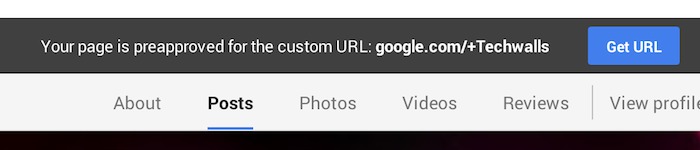
6. You will now just click on the link or the Get URL button to confirm you want to change the address.
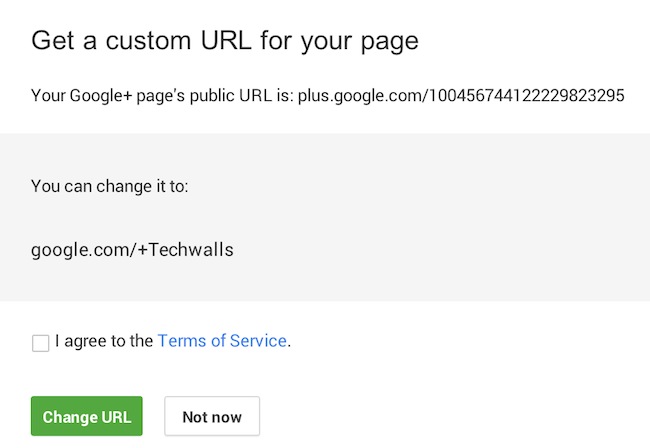
7. Now you can access our Google Plus Page through the following links: google.com/+techwalls or plus.google.com/+techwalls
2. Shorten Google+ URL
In case your page hasn’t been approved for a vanity URL as Google Plus hasn’t made it widely available yet (it is even not available for Google+ individual accounts), you need to use some alternative ways to shorten the URL like we set custom URL for Google+ Individual Profiles.
Gplus is an URL shortening service but it is not an official tool from Google, so you use it at your own risk.
Here are the steps:
1. Create your Google Plus Page
2. Go to your Page and get the Page ID on the address bar. For example, my page’s ID is 100456744122229823295.
3. Go to Gplus.to.
4. Fill in your desired Page name and the ID below, then click on the button Add.
5. Your Page URL is generated now and you will get one like this:
Let us know if you have successfully claimed the vanity URL for your Google Plus page and how you did it.
Disclosure: We might earn commission from qualifying purchases. The commission help keep the rest of my content free, so thank you!


S. Anders says
Hello,
I tried to change the URL of my Google+ page (company profile) into a custom URL. The necessary requirements are fulfilled. But the first link (http://plus.google.com/pages/create) in the text above doesn’t work. I have to log in with my login data, but then there is error 404. Can anybody help me and tell me what’s the problem.
Thank you for your support.
Tuan Do says
Hi,
I don’t have any problem accessing the link. Could you please try again?
Or Google uses different URL for other countries? That’s weird.
Bhupendra Chahar says
hi , Tuan
I have Custom URL – (google.com/+bhupendrachaharjaat) But i want to change again Custom url . I want to actual URL (google.com/+bhupendrachahar)( Also available ) But how ?
Please give me some Ideas. How to change my custom url to custom url
Anita Miller says
I would say I’m one of those happy lad who got my G+ URL customized. However, I don’t know the frequency you can apply to the changes you made.
Arslan Qamar says
I have try on my page. but I can’t see these option. Please share some video tutorial…
Himanshu Sethi says
I tried a lot, But i cant find find option of “for my site” …Please help
Muhammad Shakeel says
Hey TechWalls blog!
Thanks for such a nice post.
i have also created a G+ page for my website smartweb and completed my profile and linked my site to G+, but g+ team is talking time to verify my website.
can u tell me how many days they require or take to verify my website with G+.
Tuan Do says
Hi Muhammand,
Google sent me an email after just 2 days.
MCPETheGamerPro says
Hi, this is quite complicating bro :D Very good and worked though :D :D
Stevo says
I don’t have any of the options you describe on my Google+ page.
Arkantos says
Me neither.
Ramesh says
Good tips. I didn’t see the URL section in my About section of the page initially. Apparently, verification seems to be mandatory to pick custom URL.
midnight says
nice tips thanks
Gmail says
HELP !! I didn’t find “For Your Site” option at first.
Toorsy says
There are now NEW Rules for getting a custom URL for Google+ Brand Page:
There are a few rules to bear in mind when you’re trying to get a custom URL. If you’re having trouble, make sure that:
You have ten or more followers (people who have added you to their circles)
Your account is at least 30 days old
Your profile has a profile photo
Your account is in good standing
Thanks
Toorsy
Prince says
when i click the link for creating new google plus page i redirected to google business adding page.
Lancelam says
Hi there, I was really looking for a detailed step by step guide to do this because I was really confused about doing this. Thanks a lot, buddy. Keep posting good stuff. Cheers.
Nishat Mahmud says
Hello mate,
I have been looking for this article for a very long time. Finally, I have found your article and it helped me to build up my own Google+ Page for my website.
Thanks for sharing this useful article.
Keep up the good work.
alvina says
Hi, Thank you for the valuable article. but when I click the link for creating new google plus page I redirected to google business adding page. am not able to do the same :(
Tour Bali says
is it work for google business brand page, not the local business page