Google Page Speed, the new CDN service for webmasters, was announced last week and this has been much anticipated because it is provided by Google. The service is currently opened to a limited set of webmasters only, fortunately I have a chance to try it for free at the moment. Therefore, I decided to set it up on my new site.
My first impression is that I am quite amazed at the free service as the loading speed has been decreased dramatically. I used the Pingdom Tools to measure the speed before and after launching Google Page Speed Service and here is the result:
- Before: the loading time is 5.8s
- After: the loading time is 2.3s
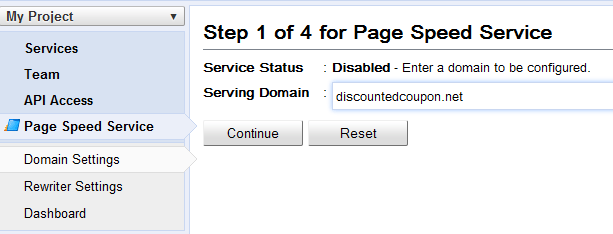
By using this service, Google will fetch your content, optimize and speed up your pages and then send them back to your readers. There is a notice that the service won’t work on bare domains such as discountedcoupon.net. So you must add the missing www prefix so that it could be supported by Page Speed Service.
Read more: Best CDN services for WordPress.
Now, let’s take a look at the detailed instructions on how to set up Google Page Speed CDN service for your website. Check out the new video guide by Google.
1. Add Domain
After being approved for trying the service, you will see there is the new tab Page Speed Service in the Google APIs Console page.
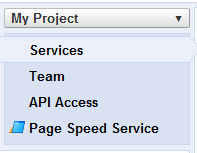
Go to the new tab and add your domain to the textbox Serving Domain. Remember it must include the prefix www.
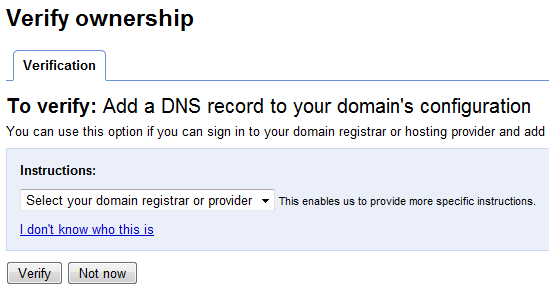
Then, it will require you to verify your domain’s ownership. What you need to do is adding a DNS record in your hosting provider or domain registrar.
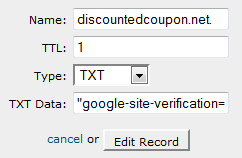
I am using HostGator, so I go to Advanced DNS Zone Editor to add the DNS record. It will take you a few minutes for DNS settings to propagate through the Internet.
2. Setup Reference Domain
The next step is setting up reference domain, this will look up the IP address to fetch the original website’s content. So, you need to point the reference domain to your hosting IP address. It is simply done by setting a new DNS entry (A-record) for ref.discountedcoupon.net pointing to the IP address of your server (the same IP address that discountedcoupon.net is pointing to). It will take some time for the propagation completed globally, you can check it out at http://www.whatsmydns.net/#CNAME/www.discountedcoupon.net.
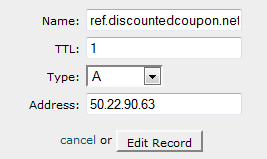
Fill in the textbox reference domain with ref.discountedcoupon.net and continue to the next step.
3. CNAME Site
In this step, you just need to go to your DNS provider’s administration console to add a new CNAME record. If a CNAME entry for www.discountedcoupon.net already exists, set its value to ghs.google.com. Otherwise, create a new CNAME record and with the value ghs.google.com.
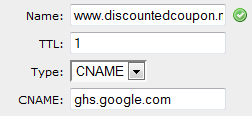
All done, now you can go to Dashboard to see live traffic status. It will show Requests, Errors and Average HTML Page Load Time for you to watch. That’s great to see the performance of this website being improved. If Google charge the service for an affordable price, I will not hesitate to use it for my blogs.
Have you tried Google Page Speed on your site and what do you think about its performance?
Disclosure: We might earn commission from qualifying purchases. The commission help keep the rest of my content free, so thank you!



Tung Tran says
I like it. I am wondering that which service is better: MaxCDn or Google CDN?What do you think?
Tuan Do says
I have tried both of the service and I will recommend MaxCDN over Google PageSpeed.
DiTesco says
Hey, congrats for being one of the few first to try GoogleCDN. I signed up for it last week but so far, no luck yet. Guess I will have to wait a while longer to test drive it too. I use CloudFlare and Incapsula and I am eager to see which of them performs best.
Anyway, looks like your site had gained a dramatic improvement. BTW, is your site WordPress? Are you using any cache plugin together with GoogleCDN?
Tuan Do says
I guess they are giving the trial to more publishers this week. I tried CloudFlare before but its speed improvement didn’t impress me like Google CDN.
Yes my site is using WordPress with no cache plugin as Google said we don’t need any more cache programs. I’m sure you will like the service when you try it on your site. :)
DiTesco says
Waiting patiently to see if I can get in soon. Thanks for letting me know about the cache plugin. I figured that much since Google says, you no longer have to worry about Gzips, compressions, and all that. At least now I know of someone who vouches for it :)
Tuan Do says
Yeah DiTestco, that’s what I understand too. :)
I hope you will get the Page Speed soon to replace the current CloudFlare. I always have to type the Captcha code each time visiting your site, it is very annoying.
DiTesco says
Hmmm, I did not know about that. It might be CloudFlare’s “security” thing. Can you tell me your IP range so I can whitelist it? That should solve the problem for tthe mean time.
Tuan Do says
I think you should turn it off so that it couldn’t affect other readers. Could you add my IP to the whitelist? My IP range is 58.187.x.x
DiTesco says
I did not turn it off, but I have set to low, which was on aggressive before. Nonetheless, i will add the IP range.. thanks.
Daniel says
I guess Google will roll out massive scale in the coming time soon. I have just checked your site at Pingdom and the result was so amazing, only 3.2 seconds. In my opinion, Google CDN is worth to try but it also depends on the price they search giant offers.
Tuan Do says
Yeah, I was pretty amazed with how Google delivers my site, the speed improvement is awesome. It is possible that Google will charge for the service and I guess its price will be very competitive, it can’t be higher than MaxCDN or others.
Jym | Blog Alchemy says
Better than CloudFlare huh? I’d love to try it.
What are the criteria for acceptance?
Thanks for sharing your experience of this Tuan Do
Tuan Do says
Hi Jym,
You could sign up and wait for your invite here: https://docs.google.com/forms/d/1lX5ixIANZtE23UXxHYORa-tm_HwW6c6wxDkW-0rUDSE/viewform
Your site will be accepted sooner if it’s got high pageviews. Hope you would try it soon.
Jym | Blog Alchemy says
Thanks Tuan Do. I’ll sign up now. I wonder what high page views means?
Better bookmark your post for when I get accepted ;)
Tuan Do says
I just meant if your site has good traffic, it will be approved earlier. Let me know if you have any problem setting it up. :)
Jym | Blog Alchemy says
Sure, sure, I get the concept, I just wonder what numbers are ‘high’. Not that it matters though… We have the traffic we have (attracting more all the time of course)
Thanks again mate
Dan Whitehouse says
How did you get approved for the service? Did they just notify you via email when you were good to go?
Tuan Do says
Yes Dan, you just need to sign up with the link above and they will notify you via email when your site is approved.
Justin Germino says
Do you still recommend or use a CDN service like Amazon S3 to host and serve static content if you use Google PageSpeed, or does this replace both Cloudflare plus non-cache CDN services as well?
Tuan Do says
Hi Justin,
I tried Amazon S3 a year ago but it was a little disappointing as I didn’t see any significant increase in performance of my site. I stopped using it just after 1 month as I don’t want to pay more $20 each month for an ineffective service.
The feature I like most about Google Page Speed is that it optimizes our content before serving to readers. Maybe that’s the reason why the loading time is decreased significantly and I’m very satisfied with it. This site couldn’t load faster than 5s when I used CloudFlare also.
I think the pricing plans of the Google CDN service will decide its success now.
Justin Germino says
Interesting about S3, did you use Cloudfront or just S3 itself to host files via push? Did you use the integrated with W3 Total Cache method?
I saw my Pingdom stats go from about 9sec load time to 5sec within 24 hours of switching to S3 and I haven’t even tried the Cloudfront offering yet. I agree about cost though, and if Google CDN is free and offers better speed with no need to put caching on your site then why not just remove the S3 and use Google CDN. I applied and hoping they let me test.
DragonBlogger.com right now is using Cloudflare+Amazon S3 and would really like to see how that compares to Google CDN
Tuan Do says
I used S3 to host my files only and of course with W3 Total Cache but I almost didn’t see any speed improvement like on your blog. Maybe it increased by just 10 or 20 ms and I almost couldn’t see the difference.
I don’t think the Google CDN will be free as they are mentioning a lot about pricing plans. Anyways, Google has the best server infrastructure, so I think its CDN service will provide the fastest speed also. I’m very eager to see its official launch.
Marck says
Good job on sharing your experience. I really want to to try Google Page Service now. If Google team is reading this, I hope that my request will be enabled soon.
The Celebopedia says
I like Pingdom.com for this purpose.
Pardeep says
Pingdom can only be used to monitor the site not to decrease the load time i think
olawaledaniel says
Thanks for the nice post about having a CDN for our website in order to make it load faster. I have registered for the service on google but I’m still waiting for the reply…Thanks for sharing :)
Tuan Do says
I think the Google CDN will be launched officially soon, you shouldn’t test it on your main site at the moment as we haven’t had many details about it.
Azuan says
I’m just try use the Google page speed service. Must wait for a week to see the performance. anyway, thanks for your tutorial. :)
Tuan Do says
Hi Azuan.
I’ve just tried accessing your site and the loading speed is quite impressive. Have you compared the loading time before and after using Google Page Speed?
Azuan says
Oh.. really?
I’m already compare, and look good… :)
Tuan Do says
Yes, it takes just over 1s to load your homepage completely, this seems to be good choice for your site.
I love the service and waiting for its official launch, too.
Azuan says
Ok. Thanks sir..
Sally Brown says
Hi Tuan,
I would like to try to use this, but am afraid I can’t even follow your instructions (which I know are actually good) because I’m not sure what some of the things are such as CNAME, A record.
I used Cloudflare for a while and had a problem doing these particular things. This is a good article and when I am more fluent with the terminology and where to go to accomplish these tasks, I’ll check it out. Thanks. Sally
Tuan Do says
It’s not difficult to set up those things, Sally.
If you are using a hosting with Cpanel, you just need go to the Advanced DNS Zone Editor to set up CNAME and A record. Leave me an email if you need any help. :)
Sally Brown says
Thank you Tuan. I’m a little overwhelmed right now with all the maintenance on blogging that I’m having a hard time finding time to write. I’m going to try to find someone to fix a few things so perhaps we can talk about this. Thanks for the reply. Sally
Thomas Zickell says
Sally,
because you are having issues with setting up DNS I would recommend one of two things the 1st if you’re also having trouble with “blog maintenance” right now get a managed WordPress host and not just any. For you I would recommend one of the very best because they literally take care of everything for you including DNS company is called ZippyKid they have competitors like WP engine, and when synthesis, however both of them require you to bring your own DNS. The only other competitor I would recommend would be Pagely as they also will handle your DNS however they do not have a built-in content delivery network like ZippyKid accompany the only uses Nginx the fastest Web server by a mile. The top of that they throw in literally everything in the kitchen sink for instance sendgrid SMTP, DynECT DNS, F5 load balancers, and I am most forgot not one but 3 content delivery networks Net DNA (the much faster brother of MaxCDN) edge cast (a rocket ship) and last but not least Google page speed for Nginx built in. The kismet and other things like Git & backups every night on the Zippy can platform as well as backups to a rack space cloud files or AWS S3 bucket so you will never lose your website regardless of what happens. The 2nd become very acquainted with DNS. You can do that by Googling “Dyn everything I need to know about DNS” Dyn is a fantastic managed DNS company and has a lot of how-to’s so does DNS made easy as well as ultraDNS.
Part B for everything else spoken about so far
1st of all want to commend you on bringing site speed to people’s attention.
The 2nd thing I want to do is explain a few things
1st whoever said 5 seconds is a good load time I’m sorry to break this to you but it’s not. Recent studies by strange loop and many others have proven that anything over 2 seconds and you’re going to start losing visitors quickly.
I hope this is of help to you,
Thomas
Swamykant says
Nice tuts. I will surely try this CDN. Thanks for the information.
ondiz says
I think that Cloudflare it’s the best cdn/optimization service!
rudraksha says
Pagespeed increases the speed of website nearly 0.4 sec. Does that found to be impressing ?
Tuan Do says
It depends on the place you are accessing your website. You need to try loading your website in different countries to see its effect.
gaidep says
i’ve signup for Google page speed but never receive approved email
How can i purchase this Cdn service ? i love google but i can’t make love with them. help me.
i’m using MaxCDN but i don’t like it :-s
Tuan Do says
Hi,
You just need to apply for the Google CDN service and you may receive it for free after a few weeks. I think Google will prioritize websites with good traffic.
Kataskevi Istoselidwn says
I use clouflare for CDN and i get better score on google page speed….i had 69 before cdn and now is 74…
Desi says
I use cloudflare and love it.
Setup is easy and free too.
I was try Incapsula but don’t why it’s stuck on the dns records scanning step. :(
Juan Manuel Garrido says
Hey Tuan! What do you think about incapsula.com CDN compared with Google?
Tuan Do says
Hi Juan,
I’m sorry I haven’t had a chance to try the Incapsula service. Google Page Speed CDN, MaxCDN, Amazon CloudFront CDN and CloudFlare are all services I experienced. I can only give you a recommendation if you are interested in one of them. :)
Vivek Nath.R says
I got an invitation, after I verified my name I’m getting this http://www.webpagescreenshot.info/i/267455-127201343903am.png
Where to add CNAME record? in host or domain provider?
Tuan Do says
Hi Vivek,
You can find it in the host provider. More details are in my comment above. :)
Alan says
I got invite to join Google CDN earlier this month, and so far I’ve mixed results. Our site now loads slower as per Pingdom in US but Google Analytics shows overall speed improvement.
Since GA takes into account all users, various browsers and countries, it seems that their CDN helped international traffic, though local US visitors would experience slight slowness.
I am keeping it for now, see how it goes before trying Cloudflare.
DanTHEME says
Excellent article Tuan, thanks.
I’m running PageSpeed CDN with Super Cache, but you’re confidently certain that no more cache plugin is necessary?
I’d be very interested in your thoughts on this.
At least what I seem to understand is there is no conflict between PageSpeed CDN and WP Super Cache used together…
Tuan Do says
Yeah Dan,
I’m pretty sure that you won’t need Cache plugin anymore because Google PageSpeed will cache all cacheable content on your site.
Trilma Rose says
Hello TUAN,
Hostgator does not support google page speed on shared or reseller hosting. They are installing it for dedicated and vpn hosting.
Tuan Do says
Hi Trilma,
Yeah that’s right. But you still can register for Google Pagespeed through the link I provided above and then you can use the service on any hosting. Good luck. :)
Zach says
Just got the invite and set it up on my site. I currently use MaxCDN. Do I have to deactivate those CNAMES and w3 total cache before using this or can I just add an additional CNAME?
Tuan Do says
Hi,
You will need to remove the old CNAMES for MaxCDN and replace with the new ones.
Btw, why do you move to MaxCDN? Actually I prefer the service from MaxCDN.
Zach says
Thanks,
Been using MaxCDN cause it works directly with W3 Total Cache.
I think I am going to sit on the sidelines and see how Page Speed develop before I switch everything over.
Chris says
Hello!
As you mentioned, I have added a reference domain (orgin.example.com), but now this A record propagated. But if I try to go to the orgin.example.com, it doesn’t show my home page. Instead of that some “Default web site page”. Are there anything missed?
Any help is really appreciated.
Alief says
my website is new, so new, the age is not more than 3 day, but it approve on google page speed cdn speed, did they realy select he best website,~~~~~lol~~~~~
Curt says
Thanks for this as I had no clue Google was doing a CDN service. They response very fast as I just submitted to them from the form you mentioned and I was approved just 5 minutes later!
For the other guy wanted to compare Cloudflare with Incapsula, I have to say Incapsula is miles better than Cloudflare. I tried CF a few times, and it always had issues and would always wind up having that 404 page come up with their logo all over. Customer Service was a nightmare and I would have to send several e-mails to get one response and after three tries I said enough.
I then discovered Incapsula which really made a huge impact. It’s very noticeable the caching it does, but even better is their security which really helps knock out spam bots and hackers very well. It will send you updates regularly (if you choose) on hacked or SQL injection attempts on your site along with the IP which you can either blacklist or whitelist so there’s no problems of blacklisting good IP’s.
I’ve been with them since January 2013 and have not had one issue which was a great relief after all the Cloudflare problems. Incapsula is definitely a very professional service and they act that way with their customer service too.
Now off to try the Google CDN to see how it ranks with my MaxCDN. Did MaxCDN just recently start the monthly service and did away with the buying 1 TB as needed?
Thomas Zickell says
You are correct Max CDN has changed its pricing unfortunately for many people. My suggestion is to use a service that is faster called Edge Cast if you google it you will see a lot of speed trials and it is a faster alternative to max CDN and the other big thing is edge cast is the only CDN out there that has Google page speed built into it. aside from the net DNA system that was built by the zippy kid
people looking to post WordPress and not utilizing mannish WordPress hosting I feel are wasting their times setting up lots of things that they don’t need to necessarily do in addition to that I feel you cannot beat the value of a truly managed WordPress hosting provider.
Utilizing ZippyKid, WP Engine, Web Synthesis, Pagely or PressLabs will lower your overall costs if you consider the time you take to set up many things.
Those of you with DNS issues as I stated before and I should add one more thing the two managed WordPress hosting companies that supply you with DNS and handle it for you are ZippyKid and Pagely however I want to tell you about another company called PressLabs it is not an expensive but it does handle your DNS.
I personally do not like the idea of having to pick one or the other in fact a multi-CDN setup is always preferred to a secular. As certain CDN’s will perform better In some places of the country or world than others. Edge cast is the fastest in the United States according to many very credible reports I recommend you look into. In other fantastic but expensive system is Level3
you can purchase edge cast from media Temple called “proCDN” for $20 a month
you can buy a CDN from PressCDN starting at $10 a month this give you access to Akamai, Edge Cast, cloud front and Max CDN in one package for very little money.
People looking to not really spend much money at all and see how it works before they buy can use Rack Space cloud files a renamed Akamai reseller for very little money much less than even Amazon.
Google page speed is going to be something that will revolutionize the web however utilizing their content delivery network in favor of a higher performing CDN such as edge cast with page speed makes it a very simple choice for me.
But we all want to have smaller size photographs with the same quality as a larger photo webP as it is called is part of Google’s page speed however I have not seen it work when I signed up they claim it is coming soon. This will take JPEG’s and make them 40% smaller so if you imagine using best practices and compressing your photos in the first place then simply allowing them to compress it even more with WebP well you will no doubt be very happy.
Another issue is SPDY Nginx the best Web server in my opinion available to us. Is able to utilize Google’s SPDY something that e-commerce people or anyone running an SSL CERT should care quite a bit about it reduces the amount of time needed in order to load the site by not even having to use a call to get to the SSL spectacular in my opinion.
For people discussing Incapsula & Cloudflare essentially they are very similar systems that delegate DDOS attacks through their any cast DNS system this to me is not a bad thing but they are not as secure as using a host like fire host or even Pagely & ZippyKid both utilize enterprise firewalls and the same in anycast DNS except for the fact that Cloudflare cost $200 to have any sort of DDOS protection. I think Incapsula It Is a Better Choice Because They Do Not Have Nearly As Large of a Customer Base and Will Be More Attentive to Your Needs.
Please Remember Content Delivery Networks Are Not Just A Reverse Proxy Server Which Is Exactly What Incapsula & Cloudflare are There Are Not A True CDN Please Use Tools like Built with A Company That Will Show You What I Mean.
Last but Not Least Very Inexpensive CDNs CDN net Is Giving Away a Free Terabyte And Has Prices Close to Max CDNs Old Ones
CDN 77 Is A Very Big System for a Very Low Price. 1 TB under $40
I Feel Most People Will Benefit From Some of the Content Delivery Networks I’ve Mentioned Please Keep in Mind If Using WordPress Hosting The Managed WordPress Host in My Opinion Is Better Solution Than Doing It On Your Own.
Thank You,
Thomas
Neil says
This is interesting but most of my sites may not have enough traffic to be accepted. I hope they roll this one out soon!
shristhi says
Hey Tuan
Thanks a lot for the amazing tip. Well Google pagespeed is really awesome thing. Currently we are using the Cloudflare service on our blog. It is also nice and free way to make you site load fast.
Regards :)
mohit says
just sent the form… hoping for the best.. although was using cloudfare but was not satisfied.. now lets see whats the reposnse using this google speed service
cheers
Jasa SEO says
Hi, do you have any guidance on how to setup cdn incapsula to our guidelines?
The plan wants to try first free package
Thank you
denny says
Hey that was so helpfull to me