Google Plus is the new social network by Google established since 2011. It is reported that Google+ now has a total of 300 million active users every month.
If you have been active on Google+ now, you possibly notice that the URL of your profile looks quite ugly, for example, here is my profile URL:
https://plus.google.com/113914713777855840452/
Google+ is now using a long ID at the end of URL which is difficult for people to remember. Here are some solutions to set username to shorten your Google+ URL so that it would be cleaner and more recognizable.
1. Google+ officially offers custom URLs
Update: Google is offering vanity URLs for verified accounts and normal accounts. You just need to type in short URLs like “google.com/+techwalls” or “plus.google.com/+tuando” to reach those pages.
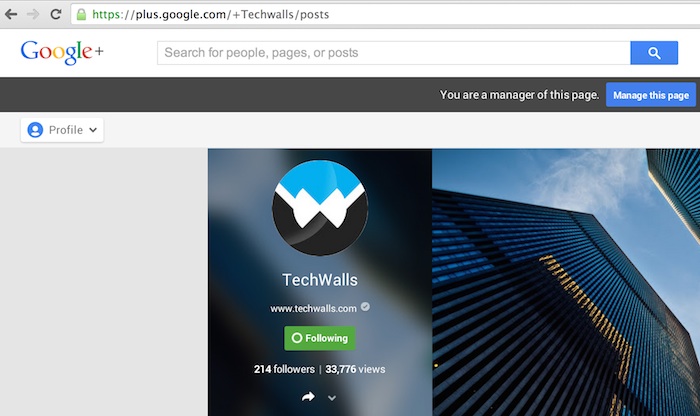
The feature is not available widely for normal users yet. Google announced that they are introducing custom URLs to a limited number of verified profiles and pages. Google has rolled out the feature and it is available to most users. You will just need to have a profile photo, at least 10 followers and an account that is at least 1 month old. Then Google will send you an email to confirm that you’ve got a custom URL for your Google Plus profile. You will also see a notification when you log in to your account. After clicking on the button “Get URL”, you will see the following screen:
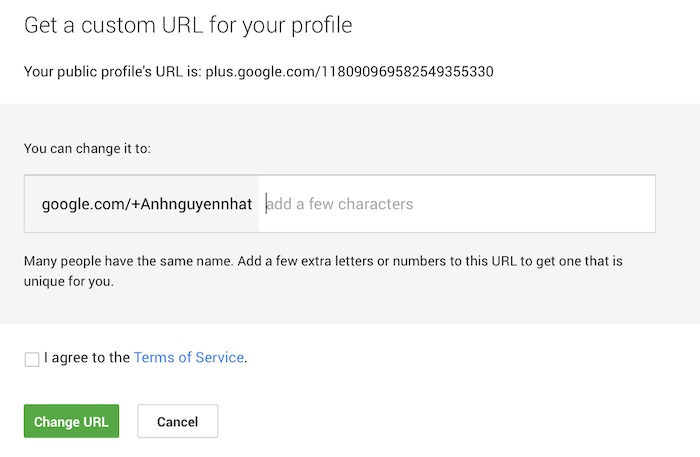
In most cases, you will have to accept the URL they offer, however, some established accounts will have to option to request a different one.
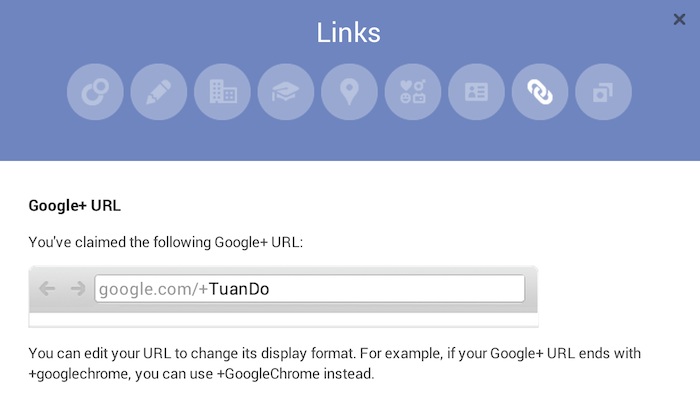
Notice that you won’t be able to change your username once you set it. You only can change its format by going to Profile -> About -> Links and choose Edit, then you will see the option like below.
Recently, Google has announced the a search-specific feature called Google+ Direct Connect. The feature gives visibility for Google Plus pages as the pages will show up when people type query in Google+ Search, for example, when people type in “+TechWalls”, they will see the icon and link to the Google+ page of the brand. To make your page eligible for this feature, you just need to install the Google+ badge on your website, read this post on custom URLs for Google+ Page for more details.
Google will determine your page’s relevancy and popularity based on its algorithms, you will be able to get a custom URL if your page qualifies. We can understand that Google encourages us to be more active on Google Plus by engaging people, updating posts regularly and driving people to add your page to their circles. You absolutely get a better chance when your page becomes more popular.
2. Google Profiles
Google Profiles is now redirecting your profile page to Google+ Profile if you have one. So you can create a profile URL like this:
https://profiles.google.com/TuanDoViet
However, you can set the username of your own because Google Profiles uses your Google username for this URL. This is also a drawback of this solution, you might have to create a new Google account to get your desired Profile URL.
You just need to go to this page to create your profile, then click on the option Edit your profile – Profile URL. Google will give you 2 choices of Profile URL, you can choose the one with your username and save these settings.
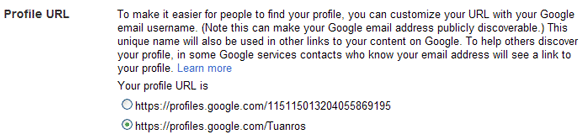
Update: Google don’t allow access to this page anymore, but you still can get a vanity URL using your own Google ID. So, your URL will be https://profiles.google.com/your_username.
3. Gplus.to
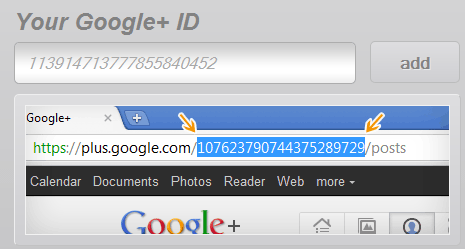
Gplus.to is a service that shortens your Google Plus profile into a neat, easy to remember link. To create your shortened URL, all you have to do is giving Gplus your Google+ profile ID, it will generate an URL in the format gplus.to/yourusername. You can set whatever name you want as long as it is still available. Here is my custom URL:
However, notice that this service is not related to Google, so you are not guaranteed to own the ID and this is also not a 301 permanent redirect.
Do you use the solutions above or any other ways to set your own URL?
suraj says
tinyURL!!!! Comment something good.. U r commenting off the topic!! Hell!!
john Does says
I dont 100% agree with this custom url. I prefer google plus because I think google is neutral and everyone have the rights to get equal opportunity. Remembering 1999 when I used to google.. I recommend it to all my friends because google is Fast and no BS in landing page. Who want to open yahoo or msn in 1999? Slow landing page…to much unimportant news…and so on.
Microsoft never learnt from this case and create Bing which they never understand it takes time to load the background image and no secure ssl connection. Geeks .. they always use high tech gear and big money client.
google itself was made famous by personal use. No need high texh and full speed internet to reload google.com.
back to Google Plus…
How about if two company in different location having similiar name.
what makes me leave Facebook because someone took my company name but never use it. In example: his company is johndoe and my company is johndoes and he just took my company name in facebook but still use johndoe in facebook..sorry this only an example.
I suggest google made the custom url based on location folder such as
GooglePlus.com/us/mysmallcompany
this will save thousands of small business around the world..and kick facebook right away.
there one thing google forget…dont forget other gadget such as blackberry and symbian and old java. Facebook..still uses by this technology now a days. If Google make app google plus for Blackberry or Symbian..they will kick Facebook right away
…
Laure Reminick says
I have the new URL, and happy with it. But I forgot to copy down the number, and I think it’s necessary to get the Google+ Crossposting widget to work on my web site. Any ideas on how to locate that number?
Tuan Do says
Hi Laure,
I found out a simple way to locate the number. Just click on the arrow of any status update, click on Embed. You will see your number ID there.
Hope it helps. :)
Laure Reminick says
It did help! Located, and notated elsewhere. Thanks very much!
Mohsin says
Is there any option to get custom URL for by business page instead of what google+ recommending me????
victor says
Yes! use the Feedback tool found on the left hand side of your Plus page (hover over Profile or Home) and then Feedback in tiny grey font at the bottom.
Send them a request to have a different custom URL and normally you’ll get something a bit better.
You still need to meet the requirements they outlined above:
Profile Photo, 30 day old account, 10 followers
Kodecupu says
Thank for your information, now I know why my google+ profile url can’t be customized because I made it for 2 weeks ago :) . have to wait for more weeks.
Tooba Awan says
Dear TechWalls
Please guide me on 1 thing. If I get a Custom URL will people be able to search my profile through the previous google plus code URL
Since I have printed the CODE URL on my company’s profile. so if i get a custom URL now, will the printed one be of use or not?
Best
Tuan Do says
Hi Tooba,
Sure you can. The CODE URL will be redirected to your new custom URL. Check out my old URL here and you will see: https://plus.google.com/113914713777855840452/
Hope it helps.
Tooba Awan says
Bunch of thanks Tuan DO
I just changed my Page’s URL to a custom one.
Rakib Al Azad says
automatically I got this custom url google.com/+RakibAlAzad
skyhittech says
I tried it and it worked for me …easy explanation Thanks
hangup says
Hey Thanks for this article , i also want custom url for my google plus profile
Abdul Moeed says
Seems to be an old Article, now you can define your own URL in GPLUS:
Sign in to Google+. Place your cursor in the top left corner for the Google + main menu and then click Profile.
Click the About tab, and under Links > Google+ URL, click Get URL.
You’ll see the custom URL you’ve been approved for, which you aren’t able to change. You may also need to add a few letters or numbers to make it unique to you.
Click the box next to “I agree to the Terms of Service” then click Change URL in the bottom left corner.
You may be asked to verify your account using your mobile phone number. To do this, you’ll need to:
Enter your mobile phone number when prompted, then click Send code in the lower left corner.
Check your phone for the code that was sent to you.
Enter that code in the box on your screen, then click Verify in the lower left corner.
This URL will be linked to your Google+ Page or Profile, so be sure everything is exactly the way you want it. Once your URL has been approved, you cannot request to change it. When you’re certain, click Confirm choice.
g99 says
Just searching and find your good tips to create custom url google plus. I will try.
Nguyễn Việt Anh says
Không ngờ tác giả của website là người(gốc) Việt Nam :D
Duyan says
i can’t still change my username..
rohith says
I have already add me url … can i change it now ….
Rizwan Amjad says
Hellow, I’m Having a problem, I changed my name while I was offered custom URL option after having 10 followers, after changing of my name it has been disappeared, I need to change my custom URL.. When and how can i get it., I checked many sites and option where we can find claim but I can not get it now.
1nterwebs says
YES you just saved me from hours of trying to get a custom google plus they kept asking me to add digits to my brand name but the profile trick worked
Plumber Los Angeles says
I am really interested to know if you change the URL, will it really improves your SEO or not? On the other hand it is good to keep it short, how about if you put the Location you are in lets say “Los Angeles” or “LA” and then Zip code after it “90013”. What do you think?
Jason says
Google has taken a foolish approach to this by not allowing you to edit the name at all. They are using my website without the “.” instead of my actual username. This creates a foolish shortened url of +wvupikapporg. On every other social media site it either defaults to the name I have chosen or I am allowed to edit it, allowing me to create a very consistent online presence. But, I can’t say I’m surprised as the whole Google+ experience is weird to me.
caro says
I have a problem I urgently need to change my profile name due to problems that have the police active… how can i do that? it really is for safty reasons
Adeniyi Badmus says
I have been searching for ways to do these, i don’t have up to 10 people in my circle yet, may be that’s why.
Anyway great tip and Thanks!
Emmanuel says
must it be at least 10 ffs?
could that be the reason it didn’t work for my profile with 9 followers??
please reply asap
thanks
Olami says
i don’t think it when someone get up to 10 followers, is only God that can tell that though!
Jacob Koshy says
Now it says that I need to upgrade to gmail for creating a username for my page, any way to do it otherwise?
ritesh nagi says
sir i am not able to open my g+ page whenever i click on it it says 404 eror ..The requested URL was not found on this server. That’s all we know ,, what should i do get my page back ,,,pls help me
Amit Srivastav says
How to get custom URL.
This mornig i got the option to get custom url but whn i clicked on it… it’s giving me an option to get the url as google.com/+AmitSrivastav….. and after my name it’s asking me to add something else as well as it’s a common name. Now I don’t wanna use my name at all in my profile url, I want to use something else…. Can someone please help me how to do that?
santhiyinvasal says
this is my google+ profile name https://plus.google.com/u/0/109419344315219867252 i could’n find the URL name change button in my profile
please help me to solve this issue
thx
Sagwe Ogoti says
I canceled the prompt to get a custom url in hopes that I would do it at a later time. I have tried to now get my custom url but unfortunately the links section is not available anymore for me to have the option to edit to my custom url. I want to get a custom url done, is there a direct link that will take me to the prompt page?
Mahbuber Rahman says
As per as I know the terms of getting custom page profile url . All I fulfilled but there is no option to change my website page url.
baazigar dogra says
Google Plus Missing Old my Profile plesae help me
Kristina Mendoza says
It’s really great to be able to customize your profile URLs, even with other social media accounts too! And doing would give people the ease to search for your handle in other social media accounts.